1 minute ago, Sandrem said:I plan to release update ~ on Sunday
Alrighty. Thanks for your work.
1 minute ago, Sandrem said:I plan to release update ~ on Sunday
Alrighty. Thanks for your work.
On 4/2/2019 at 4:04 AM, shadowfriend said:Hello there,
if there are more players around that cannot reset the animation- and maneuver speed. Here is where you can find it at the registry (WIN+R - type in "regedit"):
HKEY_CURRENT_USER\Software\Sandrem\Fly Casual: X-Wing TMG Simulator
Delete maneuver_speed and animation_speed keys there. That resets the values without risk.
hello i am not computer smart, can you please walk me through this as you would your elderly parent? :)
thanks
4 hours ago, egudmunson said:hello i am not computer smart, can you please walk me through this as you would your elderly parent?

I try.
Press and hold the Windows-button (the button between CTRL and Alt) and press the R-Button. A little window opens. In this windows type in regedit and click ok.
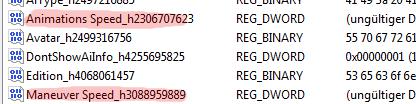
Another windows opens. Click the little arrow left from HKEY_CURRENT_USER. Click the little arrow left from Software. Click the little arrow left from Sandrem. Click Fly Casual: X-Wing TMG Simulator
Now you got several entries on the right side of the window. Rightclick Animations Speed and click delete (next to Animations Speed there are some random numbers and characters). Do same for Maneuver Speed. Close the opened windows. Done.
When you restart fly casual now the settings should have been reset. please don't try to move the bars again since the error is not fixed by that 
Cheers,
Shadow

Well, tried that. Not only both sliders go to a slower speed than half bar, if I ever click on them the same bug happens. 😕
Edited by Vector StrikeI know people have said this a lot throughout this thread, but I for one wanted to say thanks to Sandrem for this labour of love. It allows me to test ideas without having to buy, it helps with deployment etc etc etc. I could go on with how this App helps with the game, so cheers.
4 hours ago, shadowfriend said:I try.
Press and hold the Windows-button (the button between CTRL and Alt) and press the R-Button. A little window opens. In this windows type in regedit and click ok.
Another windows opens. Click the little arrow left from HKEY_CURRENT_USER. Click the little arrow left from Software. Click the little arrow left from Sandrem. Click Fly Casual: X-Wing TMG Simulator
Now you got several entries on the right side of the window. Rightclick Animations Speed and click delete (next to Animations Speed there are some random numbers and characters). Do same for Maneuver Speed. Close the opened windows. Done.
When you restart fly casual now the settings should have been reset. please don't try to move the bars again since the error is not fixed by that
Cheers,
Shadow
thank you very much that worked. and i was not trying to complain i am very excited to have this and very grateful for it as well.
On 4/4/2019 at 1:39 PM, Saag_Paneer said:I also have the problem with the animation speed... unfortunately on mac so I can't do the regedit fix. Is there keyboard control in the menu?
This worked for me on Mac:
- Deleted the current app
- Installed an earlier version
- Updated the animation speed
- Deleted earlier version
- Reinstalled latest version
= Fixed.
Hope this helps!
using Fly Casual on a Mac laptop. Flying an ARC-170 with agile tail gunner. I get through one round of combat, it tells me that I can rotate my firing arc, and then the code flashes at the top of the screen and I can't do anything else.
Also having a little trouble with VTG on an ARC, this time on Android. When I have the double tap set up, I'm unable to perform an attack, have to skip.
Quite frustrating considering how tricky it is to set up that VTG attack 
Actually, not sure what the issue is. Running Sinker alongside Wolffe, this time no VTG. Backdraft, attacked Wolffe. Wolffe fired on BD. A Zeta fired on Wolffe. Sinker, right alongside Wolffe, was unable to perform his attack and had to skip. The interaction with Sinker may be causing a problem.
Edited by Cuz05
Version 0.8.1 is released
Download: https://github.com/Sandrem/FlyCasual/releases/tag/0.8.1
Support me on Patreon: https://www.patreon.com/Sandrem
As always:
Thank you very much for the release. You rare really doin and awesome job there!
10 hours ago, Sandrem said:Version 0.8.1 is released
Download: https://github.com/Sandrem/FlyCasual/releases/tag/0.8.1
Support me on Patreon: https://www.patreon.com/Sandrem
Just tested it. Animations sliders now work!
However, this situation came up:
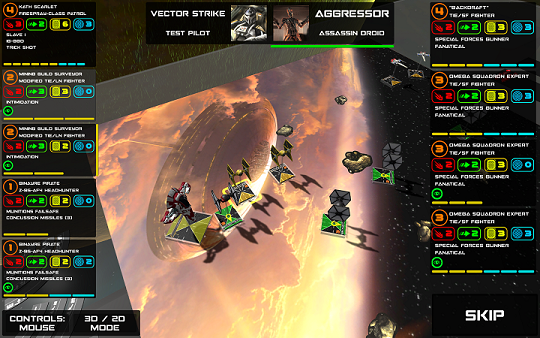
Whenever the time to select one of the TIEs came up to attack, the game didn't allow me to choose one until I hit the SKIP button once - only then the game allowed me to pick one of them to fire. I don't know why, as Intimidation is a passive Talent and the ship itself has nothing to do before firing.
The ship selection works fine for movement
Edited by Vector StrikeJust had the same problem. As it seems it is connected to the TIE SF. The bonus attack obviously has to be skipped sometimes when you face them as opponent.
10 minutes ago, shadowfriend said:Just had the same problem. As it seems it is connected to the TIE SF. The bonus attack obviously has to be skipped sometimes when you face them as opponent.
yeah. It seems like the last one will hang on the gunner selection and ask you who it should shoot at. You have to skip and then you can proceed. It's a bit spooky, because sometimes you just skip your whole next initiative if you're not paying attention.
On 4/11/2019 at 3:36 PM, Sandrem said:Version 0.8.1 is released
Download: https://github.com/Sandrem/FlyCasual/releases/tag/0.8.1
Support me on Patreon: https://www.patreon.com/Sandrem
Just come back to this after a while away, you are doing a great job.
I was wondering if the quick builds are available when selecting squads?
Thanks.
1 hour ago, The Mighty Boushh said:if the quick builds are available when selecting squads?
No. This was among goals on Patreon, but community didn't show interest in this feature.
44 minutes ago, Sandrem said:No. This was among goals on Patreon, but community didn't show interest in this feature.
Ah, I can see why you wouldn't waste time on a feature that nobody is interested in.
Thanks for answering.
Thank you for this. It is a great help and alot of fun.

any news on when internet will be back?
4 minutes ago, Akumabear said:any news on when internet will be back?
On 3/29/2019 at 10:15 PM, Sandrem said:... Current support on Patreon allows me to spend only limited time on my project. I don't have enough free time to develop all parts of the game.
... So, internet play is disabled until I will finish core parts of the game, or until I will get more time/support to do them both.
Few small good news:
I got +4 new supporters since this reply and finally reached 60 supporters (it took only 8 months to get from 50 to 60). With this speed of growth, I will need only ~3 years to get a way to develop the game as full-time developer. XD
There is one new developer (he got invite to dev-chat today), but still no developers who can help me with Unity-specific things (like UI or network). Meanwhile, one of developers helps me a lot in AI improvements.
So, current state on internet mode is "not in the nearest few months".

13 hours ago, The Mighty Boushh said:Just come back to this after a while away, you are doing a great job.
I was wondering if the quick builds are available when selecting squads?
Thanks.
Maybe not the answer you are looking for but you can probably just build them manually.
Thanks for all the continued work on this Sandrem, I've noticed and enjoyed the AI being a lot tougher lately!
1 hour ago, TheSpitfired said:Maybe not the answer you are looking for but you can probably just build them manually.
Not the illegal ones! (Like R4 Dengar or Proton Iden)
1 hour ago, skotothalamos said:Not the illegal ones! (Like R4 Dengar or Proton Iden)
So you're telling me there's a quickbuild underground? Where can I find that? This is hilariously intriguing!