New version still has problems with decloack. if you start decloacking on a rock the game make you spend 1 charge of collision detector also if you would decloack in a way that the manouver template doesen't overlap the obstacle
Fly Casual X-Wing Simulator
Will this run on iOS or at this time?
1 hour ago, Pooleman said:Will this run on iOS or at this time?
I don't create iOS builds, they are created by another developer. I asked him to create build for v1.2 - but seems that he is busy. If there are another iOS developers who have time to do this - they are welcome. (To build unsigned IPA file for iOS - you need to have MacOS with XCode, PM me for instructions if you are interested to try)
(Or donate me enough to buy own device with MacOS for these purposes XDDD)
Edited by SandremI haven't been able to get sideload working since one of the recent iOS updates killed Impactor. Anyone have a good solution?
Just loaded fly casual on the laptop, just noticed there's an entire room!
Great work anyway
Still looking for a way to get it to run in a not-jailbreaked ipad...
Gonna post this on Github too, but I'm having issues doing online multiplayer on a local network (playing with my son). First, unless both players have the same mods on, and possible the same battle mat, the joining player (JP) will not see the host player's (HP) ships; and once JP places his ships, it actually places HP's ships on JP's side. If we ever get to move them, JP moves HP's ships.
Once I figured out (by eliminating possibilities) the thing about mods and battle mat, we managed to get playing... but it always freezes at a certain point, earlier or later. One player makes his moves, actions or attacks, and the other doesn't see it, and that's it. I've had this happen ocassionally in online games over the internet, but on my local network, it's every single match.
Adding screenshots, probably won't be of much help. Thanks for the awesome work!


Adding screenshots.
Incidentally, we just managed to play by having my son use a VPN to connect to the game as if he was outside of the local network. That's something!
Strange and interesting. Why would a LAN make the game's netplay break? I would expect the opposite.
Can anyone walk me through the process of opening the port on my router to allow a friend to join my game. I can’t figure this out.
- In a browser, go to your router address. It's usually http://192.168.0.1 or http://192.168.1.1
- If the address is right, you will see some login webpage asking you for username and password. Usually you need to enter the router's admin credentials here. This changes per router brand and model, so you better check your router manual. In most of the routers I have had, it's been username: admin password: admin.
- Find the section where you manage the port redirection. It is usually under Advanced settings, and it's called "NAT", "Network Address Translation", "Virtual Servers", "Port Forwarding", or some other similar name.
-
Find the way to add a new "server" or "service" to the table. It usually consists on specifying an internal IP, internal port, external port, and the protocol.
- In the internal IP you need to specify the local IP address of the computer running Fly Casual which your friend will connect to. This address will usually start with 192.168.xxx.xxx. You can find the IP address of your computer by opening a command line (Start button, type cmd and press enter), and typing the ipconfig command. (Just ipconfing, and press Enter).
- In the internal and external port, you need specify the port that Fly Casual uses (that is 7777).
- In the protocol, specify TCP or TCP/UDP.
- Save the changes. You router might want to restart. Let it.
- Start the game in your computer as a host. Windows might now be asking you in the desktop (check if the window doesn't appear on top of the game) whether you allow the game to accept incoming connections. Say yes.
- Your friend must enter your router's external IP. You can now what your external IP is by going to https://www.whatismyip.com/ . It's the one called Public IPv4 address.
- If all went well, your friend's game will connect to your game.
- Play, have fun.
- Profit.
Edit:
If your computer is set to get a dynamic IP address from your router every time it's switched on, you will need to repeat the entire process every time.
Perhaps you better change your computer to have a fix IP address in Windows network settings.
31 minutes ago, Azrapse said:
- In a browser, go to your router address. It's usually http://192.168.0.1 or http://192.168.1.1
- If the address is right, you will see some login webpage asking you for username and password. Usually you need to enter the router's admin credentials here. This changes per router brand and model, so you better check your router manual. In most of the routers I have had, it's been username: admin password: admin.
- Find the section where you manage the port redirection. It is usually under Advanced settings, and it's called "NAT", "Network Address Translation", "Virtual Servers", "Port Forwarding", or some other similar name.
- Find the way to add a new "server" or "service" to the table. It usually consists on specifying an internal IP, internal port, external port, and the protocol.
- In the internal IP you need to specify the local IP address of the computer running Fly Casual which your friend will connect to. This address will usually start with 192.168.xxx.xxx. You can find the IP address of your computer by opening a command line (Start button, type cmd and press enter), and typing the ipconfig command. (Just ipconfing, and press Enter).
- In the internal and external port, you need specify the port that Fly Casual uses (that is 7777).
- In the protocol, specify TCP or TCP/UDP.
- Save the changes. You router might want to restart. Let it.
- Start the game in your computer as a host. Windows might now be asking you in the desktop (check if the window doesn't appear on top of the game) whether you allow the game to accept incoming connections. Say yes.
- Your friend must enter your router's external IP. You can now what your external IP is by going to https://www.whatismyip.com/ . It's the one called Public IPv4 address.
- If all went well, your friend's game will connect to your game.
- Play, have fun.
- Profit.
Edit:
If your computer is set to get a dynamic IP address from your router every time it's switched on, you will need to repeat the entire process every time.
Perhaps you better change your computer to have a fix IP address in Windows network settings.
We specifically mean the router, correct, not the cable modem? I have an Apple Express router and these web addresses are not allowing me to enter the router. Apple does have an app that may allow me to make these specific changes.
Hey not sure this has already been addressed just yet. But i just had an issue where i was flying a Silencer and after first doing a barrel roll then a boost. But once my ship did its 1 forward boost the ship just kept flying right off the mat.Is this common or just something new? Thanks.
Restarting game, this happen

Something appears to have misfired:
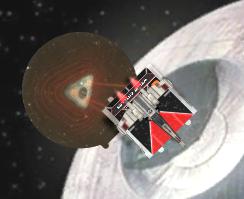
This happened after tractoring.
1 hour ago, Whalers on the moon said:Something appears to have misfired:
This happened after tractoring.

this also happens from time to time when tractoring onto obstacles, their effect fails to be triggered
Fly Casual v1.3 is released
Small update, bugfixes and new skins
Download: https://github.com/Sandrem/FlyCasual/releases/tag/1.3
Support me on Patreon: https://www.patreon.com/Sandrem
Is anyone else having issues with the crash reporter popping up continuously in 1.3 or did I mess up my installation some how?
13 minutes ago, Darth Wrath said:Is anyone else having issues with the crash reporter popping up continuously in 1.3 or did I mess up my installation some how?
I have reports that Gas Clouds cause error "CollisionMeshData couldn't be created because the mesh has been marked as non-accessible". Don't use then until update will be released.
"YOUR GREEN DICE WILL BETRAY YOU / THE BEST GREEN DICE ARE THE ONES YOU DON'T HAVE TO ROLL"
Love it! 😂
Is there a page or area I can look at for all the controls? Would like to be able to zoom in at times.
Hello everyone. Is there a resource someone can point me to to help install fly casual on linux? I have a new chromebook and have no idea what I'm doing.
New feature: Popular Squads
(data from meta.listfortress.com)
https://www.youtube.com/watch?v=j8vxMiOio3s
Edited by SandremOn 7/20/2020 at 11:19 PM, Force_User said:Hello everyone. Is there a resource someone can point me to to help install fly casual on linux? I have a new chromebook and have no idea what I'm doing.
Echoing this request, any way to install it in a non-jailbreaked ipad?
9 minutes ago, LUZ_TAK said:Echoing this request, any way to install it in a non-jailbreaked ipad?
I don't own any Apple products. Ask advanced users of Apple products how do they install unsigned IPA files. As I remember, "Cydia Impactor" application was used for this.
Edited by Sandrem