Is it possible to save a list without it going public? I have some lists I want to torture @Fightwookies and @wannabepudge with that I don’t want to spoil.
Tabletop Admiral overhaul almost complete. Feedback pleeeeease
7 minutes ago, seef1033 said:Is it possible to save a list without it going public? I have some lists I want to torture @Fightwookies and @wannabepudge with that I don’t want to spoil.
Not at the moment. I guess the best bet would be to save your list code somewhere.
The other option is to just add something that makes it illegal, like have too many points or something. That SHOULD keep it hidden, and as long as you know the fake part, should do the trick?
I added an autofiltering check box. If you uncheck that, search and filtering by cost and sorting will still work, but it will give you EVERYTHING as an option.
Hopefully that appeases those who liked the old way better. I think the only thing that would be missing is selecting a faction, but at least now it's a searchable database of every card.
46 minutes ago, werdnaegni said:Working on a fix for J4X
not sure if it's related, but it looks like J4X shows up in the general mercenary lists also, before I add the elite jawa.
I'll have to figure that out tomorrow. Leaving for the day. Thanks for all the help testing so far!
7 hours ago, seef1033 said:Is it possible to save a list without it going public? I have some lists I want to torture @Fightwookies and @wannabepudge with that I don’t want to spoil.
@werdnaegniPrioritize this one right into a trashcan where it belongs, haha.
Edited by Fightwookies
Looks Great @werdnaegni, a big thanks for your hard work! The one thing I've long searched for is a way to consult existing lists with multiple filters (such as "must contain: bossk AND leia"), in order to see what people have come up with... I wonder if there's a way to add a search filter to the "latest lists" page?
Just now, Gingerleo said:Looks Great @werdnaegni, a big thanks for your hard work! The one thing I've long searched for is a way to consult existing lists with multiple filters (such as "must contain: bossk AND leia"), in order to see what people have come up with... I wonder if there's a way to add a search filter to the "latest lists" page?
I do plan to add something like that. At least SOME kind of filtering.
17 hours ago, werdnaegni said:As for options being tied to what you own, you could just put that you own 5 of everything and that problem would be solved, wouldn't it?
Ha ha, that was the exact number I was going to plug in. Yes, this does solve it, but I find this an added step that I worry will confuse people. I know to do this because I'm (over)active on the boards, but to newbies coming to the game later on or those who don't frequent these boards, will they know to adjust what they own? It seems an unhelpful sorting mechanic. I know this makes it easier for people to build a list with just what they own, but I think people would be better served by seeing what all is out there and then swapping out for the cards they don't own.
Just my two cents :-)
-ryanjamal
41 minutes ago, ryanjamal said:Ha ha, that was the exact number I was going to plug in. Yes, this does solve it, but I find this an added step that I worry will confuse people. I know to do this because I'm (over)active on the boards, but to newbies coming to the game later on or those who don't frequent these boards, will they know to adjust what they own? It seems an unhelpful sorting mechanic. I know this makes it easier for people to build a list with just what they own, but I think people would be better served by seeing what all is out there and then swapping out for the cards they don't own.
Just my two cents :-)
-ryanjamal
I think you're right, and it made me remember that I need to change the default from 1 of everything to 5 of everything. Then the worst case is if they forget to change it, it works as though you have everything. I'll put a reminder on the page somewhere or something though.
1 hour ago, ryanjamal said:I know to do this because I'm (over)active on the boards
pfft. no such thing. LOL 
3 hours ago, werdnaegni said:I think you're right, and it made me remember that I need to change the default from 1 of everything to 5 of everything. Then the worst case is if they forget to change it, it works as though you have everything. I'll put a reminder on the page somewhere or something though.
Actually, I would make the default 6, just in case someone wants to go for that Alliance Smuggler spam (4 regulars and 2 elites) :-)
-ryanjamal
New version is now up at the old URL. Let us pray that it's not broken.
You can now edit your lists if you get to them through your profile.
There's a print view now. I'm going to improve it.
JSON export works
Lists will now load in the new view
There's now just one page. You select your faction at the beginning.
More to come, of course.
One issue I know of is if you load somebody else's list, it still asks you for your faction. I've got to change a few core things to get that fixed.
Anyway, here you go: http://tabletopadmiral.com/imperialassault
Officer's Training lists that it comes in Heart of the Empire. Most other things I've found list it as coming with Palpatine. I don't actually know for sure which is right...
Great site, thanks for taking the time to put it together. I'm sure this is a ton of work for you and I hope you are enjoying it. I don't have much experience designing these sorts of things, but I do have a lot of experience using your site and a couple others like it for IA. I've liked using yours the most lately. Here are some opportunities that I think would improve the new version of the site.
*The mobile version is tough to use because the icon to select a card sits between two card names. I can get used to this, but it's going to require some scrolling up and down to make sure I put the right stuff in there. Not gonna lie--this will annoy me.
*I would prefer the new feature, that requires you to select a certain faction from the outset, to go away. I liked the old version better in this respect. I liked how easy it was on your site to add/remove factions in one click. Lastly, the setup makes it more difficult to just jump on and quickly reference a card. I use the site for that all the time and now there are added steps in the process.
*I can handle the new aesthetics, but simple text and simple shapes for each card in the list on the left looked better to me. The current font seems stretched and the shapes you chose over the rectangles from the old version add to the perceived distortion.
FYI it looks like clicking the imperial temp alliance makes all the options go away for me. Anyone else getting that?
Thanks for asking for feedback, you do an awesome job with that site.
Edited by seef1033**change of heart on a few features I was down on
23 hours ago, Clutterbuck said:Officer's Training lists that it comes in Heart of the Empire. Most other things I've found list it as coming with Palpatine. I don't actually know for sure which is right...
Looks like you're right. Fixed.
2 hours ago, seef1033 said:*The mobile version is tough to use because the icon to select a card sits between two card names. I can get used to this, but it's going to require some scrolling up and down to make sure I put the right stuff in there. Not gonna lie--this will annoy me.
Not sure what you mean by this, but maybe it's laying out differently on your phone. For me, they're right next to the name they correspond to. Is the "add" button going to a new line for you? Or could you send a screenshot?
2 hours ago, seef1033 said:*I would prefer the new feature, that requires you to select a certain faction from the outset, to go away. I liked the old version better in this respect. I liked how easy it was on your site to add/remove factions in one click. Lastly, the setup makes it more difficult to just jump on and quickly reference a card. I use the site for that all the time and now there are added steps in the process.
I guess the answer is to just put the old filter back, but still allow you to pick your faction.
That way if you want to go the old way, you can just uncheck autofiltering and check the faction you want.
As far as quickly searching goes, you can search the whole database by just unchecking autofiltering.
2 hours ago, seef1033 said:*I can handle the new aesthetics, but simple text and simple shapes for each card in the list on the left looked better to me. The current font seems stretched and the shapes you chose over the rectangles from the old version add to the perceived distortion.
Noted. I'll see about toning it down.
2 hours ago, seef1033 said:FYI it looks like clicking the imperial temp alliance makes all the options go away for me. Anyone else getting that?
You're right. I think I know what the problem is. Fixing now. Edit: Fixed
Edited by werdnaegniAttached a photo of what I see on the iPhone 6s from both Safari and Chrome

10 hours ago, seef1033 said:Attached a photo of what I see on the iPhone 6s from both Safari and Chrome
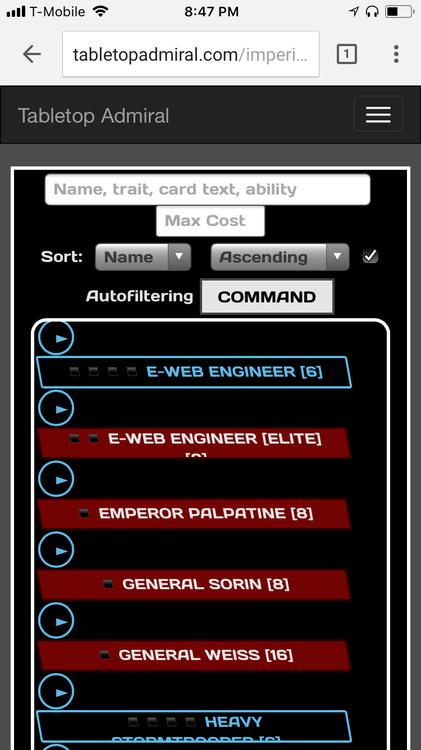
Ah, yeah that's not how its supposed to look. They're on one row for me. I'll fix it.
It doesn't seem to add Health up properly. When I add a squad with multiple figures (I tried eSabs), I only get the health from the first figure in the squad.
I also very much miss the drop down filter on especially command cards.
1 hour ago, aermet69 said:It doesn't seem to add Health up properly. When I add a squad with multiple figures (I tried eSabs), I only get the health from the first figure in the squad.
I also very much miss the drop down filter on especially command cards.
Whoops, yeah forgot to multiply health by figures.
Which dropdown? The trait one? I didn't think that worked well enough but I can bring it back. I think the search bar Does everything but I guess you can't search AND filter by trait now
IT's just faster with the drop down... I can see how it's double up though... maybe I just need to learn the new interface better.
16 hours ago, seef1033 said:Attached a photo of what I see on the iPhone 6s from both Safari and Chrome
Can you give it a try now? Might want to clear your cache so it grabs the changes.
I took away [Elite] at the end of elite cards to save space, since they're red, so you know. Then I shrunk the buttons a little. Let me know if that does the trick
10 minutes ago, werdnaegni said:Can you give it a try now? Might want to clear your cache so it grabs the changes.
I took away [Elite] at the end of elite cards to save space, since they're red, so you know. Then I shrunk the buttons a little. Let me know if that does the trick
Works for me! Thanks.
Also noticed that the ▪ symbol doesn't show up right on mobile, so for now I've replaced it with "|" to show quantities available.
I'll figure something prettier out later, but that should cut down on overflowing buttons.
Total health should calculate correctly now.