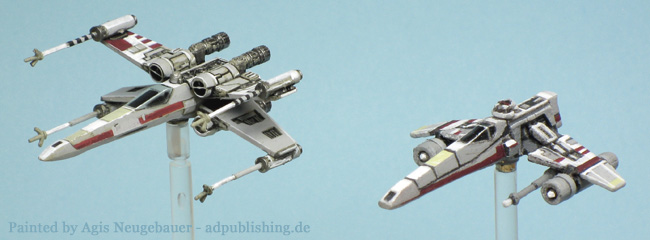
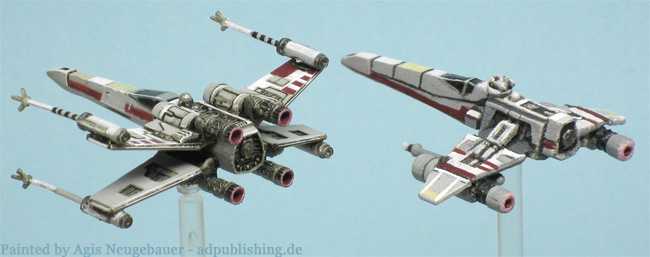
Fantastic!
Thanks folks, more will follow!
You ARE Ridiculous ...and we like that around here.
Welcome!
This is a suggestion someone has made for Shapeways models. I've read the whole of his post and it seems like he really knows what he is talking about
What I have found that works really well is a $25 ultrasonic jewelry cleaner off of E-Bay and isopropyl alcohol. The trick is to not have it in the alcohol for more than 10 minutes at a time and wash the parts off with cold water when you’re done. You also have make sure the alcohol does not get to hot in the ultrasonic cleaner while its running. Heat is great for removing wax but really bad for FUD parts. FUD’s melting temperature is 80 C but thin parts will start to deform and bend not much over 100 F… My cheap ultrasonic cleaner cycles off after 3 minutes so I stick my finger in after each cycle to make sure it’s not getting to hot…. The end result is a perfectly smooth, clean translucent surfaces, just like acrylic material is supposed to look .
www.zcentralstation.com/index.php?option=com_kunena&func=view&catid=33&id=12003&Itemid=212
Hmm, the ultrasonic cleaner sounds like a plan!
Have to consider it!
Welcome to the boards Agis! I'm assuming you're going to be putting everyone and everything to shame with your stunning paintjobs and astounding artistic talent... I'm expecting nothing less!
He is scary good...but... Beware The RATT.
![]()
What Rat? where?
Well Rodent's repaints got me into the game to be honest!
He IS the master of X-Wing repaints!
BTW - Just ordered an ultrasound cleaner, I have 2 Z-95s and some TIE Drones to do, so I will try the above mentioned method!
Tell me how it goes, I'm really interested in some of the ShapeWays sculpts but all the pictures I've seen the surfaces look fuzzy. If UD, the solvent and the cleaner works I'll definitely be getting some of those sweet Tie Drones and some Tie-Wings.
BTW I haven't said it but that X-Wing looks a very clean and tight paint job.
Same here...I am all about adding new cool stuff to the game, but NOT if it looks like crap...
Ratt is a keeper. He keeps doing things that I think about before I get them done...because I am a bum.
Buying a ton of models is fun but...I need to get time to WORK on them.
Agis,
working with the Shapeways 3D printed models (or any 3D printed models, I suppose) is all about prep work. By that, I mean it is about how you prime and prepare your models. Some of the Shapeways materials are quite porous (WSF, for example), others somewhat less so (FD & FUD) and require priming. I have done a LOT of Shapeways models, most in WSF as it is the cheapest and most durable (but has less detail) and can appear rather grainy of "fuzzy" if not properly prepped. So, how is it done? Well, I have experimented with numerous techniques and, In short, it is all about layers. This is my usual technique:
1. Wash the models in warm (not hot), soapy water. This is important to remove any of the inert, powdery, support material.
2. Towel off and let dry.
3. Prime. I have used numerous methods and they all work. I'm not really sure what I like best but here are a few:
a. paint with a thinned down PVA glue and let dry thoroughly
b. spray with any available auto primer paint
c. spray with a primer specially formulated for plastic (this is new and may be my new favorite)
d. paint with several coats of Future (or other brand) acrylic floor polish
(the point here is to fill in the pores and produce a more smooth surface. Don't expect it to be as smooth as a plastic or metal casting... we'll get there)
4. Lightly sand (be careful not to remove detail) and prime again (whatever you used above)
5. Paint primary color (I use any available acrylic model paints- Citadel, GW, Valejo, Game Color, Model Color, etc... , sprays or craft paints)
6. Wash- I use the "Magic Wash" method (look it up, it is pretty simple. basically, 1 part Future floor polish to 4 parts H2O, then mix a dab of paint per bottle cap of Magic wash and apply as carefully or liberally as you wish) and Let dry. (As the "Magic Wash" contains acrylic floor polish, it also helps to seal and smooth the surface)
7. Dry brush original or slightly lighter shade of original color
8. Paint details
9. Pin wash selected areas
10. Spray with clear GLOSS (I like Krylon Crystal Clear), let dry
11. Apply decals (if any) by brushing undiluted Future where you want the decal. When decal has set, top coat it (and surrounding surface) one or two times.
12. Any touch-up paint or pin wash
13. Clear coat with clear gloss coat (Krylon Crystal Clear, etc...), this protects all your hard work!
14. Spray with matte finish (Testors Dullcote or Krylon clear matte) to dull it down a bit
15. paint glass and other glossy areas with a coat of Future floor polish to make them shiny again
By building up layers, the eventual surface will be much smoother that it was when you started. Because the basic colors and detail work is done before you seal it with layers of clear cote, the detail is still visible/emphasized even if they may not offer much surface relief when you are done.
For more techniques, visit the Wings of Glory Aerodrome, Hobby Section, as a lot of the players of that game have added to their collections by purchasing from Shapeways or other 3D printers.
Hope this helps. Good luck,
Chris
Great work Agis!
Big thanks folks and especially Chris.
:)
I checked your list, I only missed 3a (hides too much detail IMO),
6 and 7 (IMO not necessary on this model),
9 (do not like the technique),
10 and 11 (no transfers on these models - personally I use Vallejo decal medium and finish, is not hiding any surface detail and works for me like a charm)
13 (as above)
15 (I am using epoxy glue and rough surfaces that should look like glass)
So in a way I am already out of options...
That's why I put much hope into the ultrasonic cleaner!
Oh the other hand in the face of all that work; Shapeways could just make models that do not suck...
Really great pain job, congrats.
Yes indeed. You did an excellent job with those
Those are insanely, insanely clean paint jobs. Really fantastic, and easy to underestimate.
The temptation of the Dark Side...
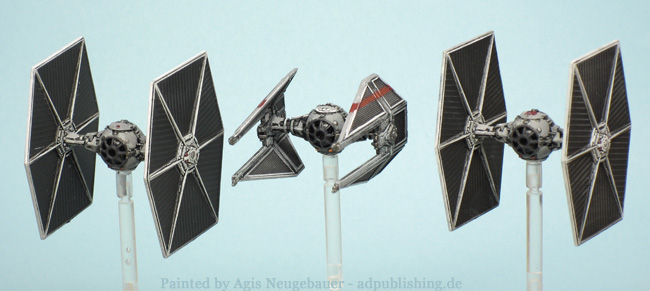
Two Ties and one Tie Interceptor, nothing fancy here, just clean repaints.Some more Shapeway models are on the table...more pics: http://www.adpublishing.de/html/x-wing.html
Did you find the TIEs as much of a pain as me. There is something about them where you have to put in a huge amount of effort just to get them to look a bit better than average.
Not so difficult, but to be honest I did not had to add that much...
AHHHHHHH I want that E-wing!!!!
Sadly that E Wing no longer exists Shapeways had a file crash and it was one of several of my designs that bit the dust. But i have rebuilt it and reuploaded to them. And used the opportunity to enhance the details to make them show better. The revised version is almost identical though as i still had the base shape on my computer to work from.