Great work Nyarlazorbec!
Now you should make someone an android version... hehehehe...
Thanks a lot!
Great work Nyarlazorbec!
Now you should make someone an android version... hehehehe...
Thanks a lot!
Good to see your program updated. Thanks for it!
This is great! Thanks very much!
Any chance of getting the ability to sort/filter by set? For instance, I don't have Osgiliath, so i do not want to see cards from that expansion.
Thank you, all, for the nice comments 
AmAvocet said:
This is great! Thanks very much!
Any chance of getting the ability to sort/filter by set? For instance, I don't have Osgiliath, so i do not want to see cards from that expansion.
You have that in the Filters and Sort pages of the encounter screen. The point is that the filters setting is not persistent between two DeckBuilder sessions, but sort orders are. Tell me if you need some help.
Cheers,
Zorbec
Nyarlazorbec said:
AmAvocet said:
Any chance of getting the ability to sort/filter by set? For instance, I don't have Osgiliath, so I do not want to see cards from that expansion.
You have that in the Filters and Sort pages of the encounter screen. The point is that the filters setting is not persistent between two DeckBuilder sessions, but sort orders are. Tell me if you need some help.
I have just started trying to figure it out, and I didn't see an encounter screen (or at least did not recognize it). How would I find the place to select which sets are included?
AmAvocet said:
Yeah, I was thinking about this as well; Is there a way to tell the tool what you actually OWN in your own collection? To sort of filter and set the bar for how many cards you can add etc. ?
/wolf
AmAvocet said:
Nyarlazorbec said:
AmAvocet said:
Any chance of getting the ability to sort/filter by set? For instance, I don't have Osgiliath, so I do not want to see cards from that expansion.
You have that in the Filters and Sort pages of the encounter screen. The point is that the filters setting is not persistent between two DeckBuilder sessions, but sort orders are. Tell me if you need some help.
I have just started trying to figure it out, and I didn't see an encounter screen (or at least did not recognize it). How would I find the place to select which sets are included?
Hi,
From the main screen, click on the button showing an encounter card back (the first on the left). If correctly activated, it should be surrounded by a yellow line. This will bring the Encounter cards screen up (if not, it means that the screen is probably moved outside your screen limits for some reason. In this case, you can reset all screens positions by pressing the Ctrl+Alt+L keys).
In the Encounter cards screen, click on the "Filters" top bar button to display the filters. The first filters page is for encounter sets. If you selected a speficic quest or scenario in the "Scenario/quests" screen, you can filter the sets used for the scenario by clicking on the "Scenario" blue button located above the sets list.
If you want to sort the list, click on the "Card sorting" top bar button to display the sorting page. There, you can combine up to 4 sort criteria in any order (ascending or descending).
Hope this helps ! (if not, ask again !)
Cheers,
Zorbec
GhostWolf69 said:
AmAvocet said:
Yeah, I was thinking about this as well; Is there a way to tell the tool what you actually OWN in your own collection? To sort of filter and set the bar for how many cards you can add etc. ?
/wolf
Hi,
Unfortunately, I didn't put collection management (yet !). The "Qty" indication refers to the quantity of cards into a single original set (core set or adventure pack). So, I assumed that most people would remember easily how many cards they own depending on the sets they own. It is not a feature as critical as with CCG games.
Adding this collection management is quite heavy and it's not on the top of the priorities. Yet, I will note this for a future implementation.
Cheers,
Zorbec
Ah! I was trying to do it in the Player Cards window!
Thanks very much. I appreciate the help, as well as the time and effort you put into creating this utility. May the hair on your toes never fall out!
Is there a way to add categories to the display? When i right-click on a title bar I can change the category to a different one, but can I insert one? For example, if I want to show both quantity and victory points, can i do so without removing an existing category?
Also, is it possible to resize the columns? Often when I filter a category all the entries have short names, and I would like to eliminate the wasted space while viewing the display.
Thanks again for this great utility!
AmAvocet said:
Is there a way to add categories to the display? When i right-click on a title bar I can change the category to a different one, but can I insert one? For example, if I want to show both quantity and victory points, can i do so without removing an existing category?
Also, is it possible to resize the columns? Often when I filter a category all the entries have short names, and I would like to eliminate the wasted space while viewing the display.
Thanks again for this great utility!
Thank you for the kind words !
Unfortunately, the number of columns for cards lists is fixed and they are not resizable (their size is optimized to show the longest data of the whole card database). This was done to simplify the development and the user interface. As it requires much work to make something completely flexible, I'll put it in the list, but not in the highest priority 
Cheers,
Zorbec
Wow, this tool is really, really useful. Great job doing this!
I have a couple of suggestions if you are interested. The first one is easily done I think, but the other one may turn out to be more complicated (but I think the usfullness of it will be worth the effort). They both have been briefly mentioned in this thread but I think it is good to get in plain text.
1. When you filter the available cards it would be neat if you could filter different adventure packs/core set.
2. A feature where you can state how many core sets and adventure packs you have got in your collection and keep track so that you cannot choose too many cards. The qty should reflect this as well.
In addition it would be very neat if this could be combined so that you can group several of your decks so that they share the same card pool (very handy if you plan of creating decks for a 2, 3 or 4 player game out of your collection). When you choose a card the available qty should decrease for all the decks in that card deck group.
Thanks for this excellent tool!
Hinnyboy said:
Wow, this tool is really, really useful. Great job doing this!
I have a couple of suggestions if you are interested. The first one is easily done I think, but the other one may turn out to be more complicated (but I think the usfullness of it will be worth the effort). They both have been briefly mentioned in this thread but I think it is good to get in plain text.
1. When you filter the available cards it would be neat if you could filter different adventure packs/core set.
2. A feature where you can state how many core sets and adventure packs you have got in your collection and keep track so that you cannot choose too many cards. The qty should reflect this as well.
In addition it would be very neat if this could be combined so that you can group several of your decks so that they share the same card pool (very handy if you plan of creating decks for a 2, 3 or 4 player game out of your collection). When you choose a card the available qty should decrease for all the decks in that card deck group.
Thanks for this excellent tool!
Hello,
Thank you for the kind words and for the suggestions.
Your first request (set filter for player cards) will come in a near future. I waited for more packs to be available before implementing it. Encounter cards already have a similar filter by encounter set, which is more appropriate.
Regarding your second request, I was planning a collection management for a much later implementation. But your description of it is much simpler than my previous idea of it. So, I may consider this for a much quicker release
Last point would be clearly difficult to do, as the program is designed to work with one deck at a time. I'll see...
Cheers,
Zorbec
Hello, fellow Middle-earth travellers !
A new version of the LOTR LCG DeckBuilder for Windows is now available, with some good new features.
Here is a summary of the new things:
Note 1: the Journey to Rhosgobel scenario text is not available yet, the rest is Ok.
Note 2: the hypergeometric distribution algorithm for probabilities gives weird results when the deck contains a few cards, the searched and drawn cards are more than 1. Consequently, the probabilities will not be show in such cases. If one has a good algorithm to deal with these extreme cases, I would be interested.
I will now give you screenshots to illustrate the main new features.
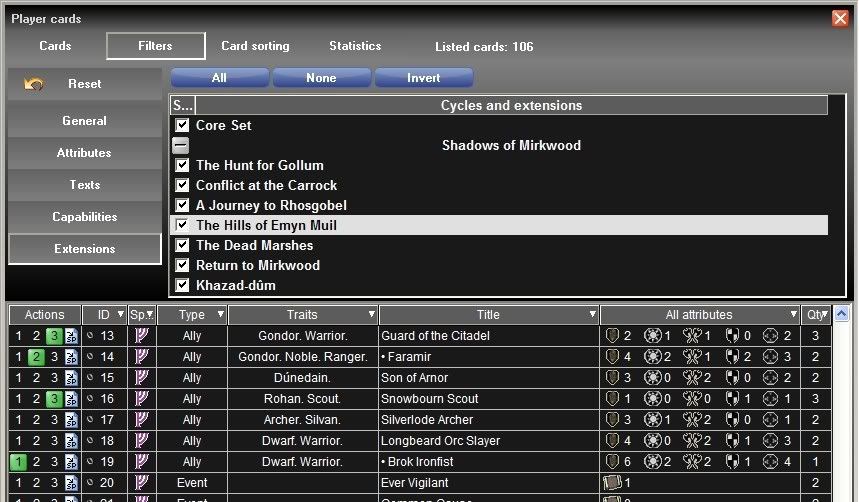
The new filter by sets for the player cards (it also shows the green background indicators for all cards, showing the current quantity put into the deck):
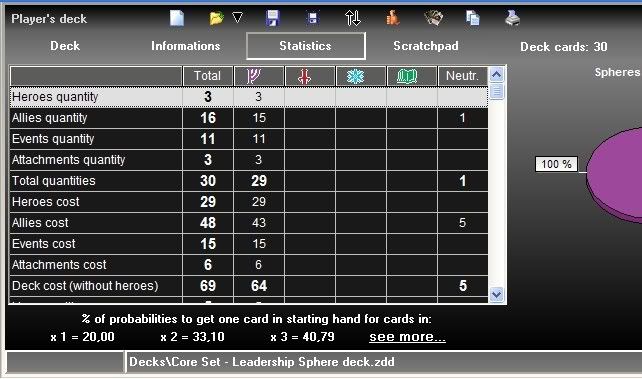
The starting hand drawind probabilities in the deck statistics page. You can click on the "See more" text to show the card drawing simulator with the full probabilities page active (see below):
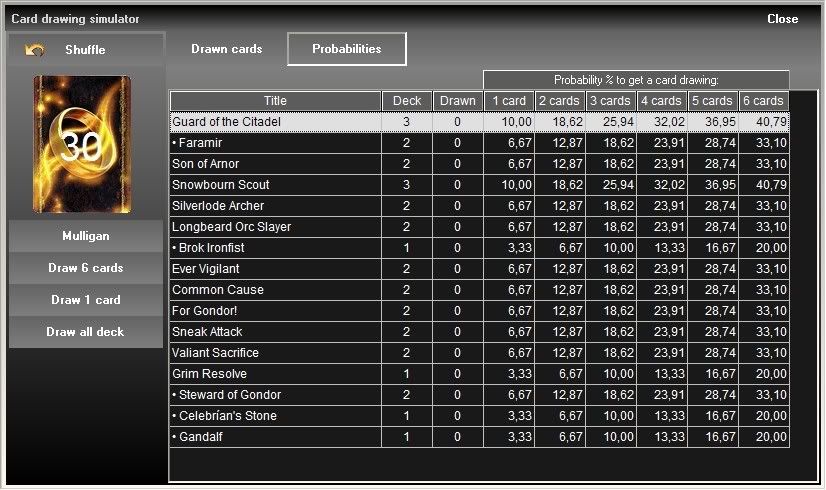
The complete drawing probabilities into the card drawing simulator. These are calculated each time you draw cards (see note 2 above):
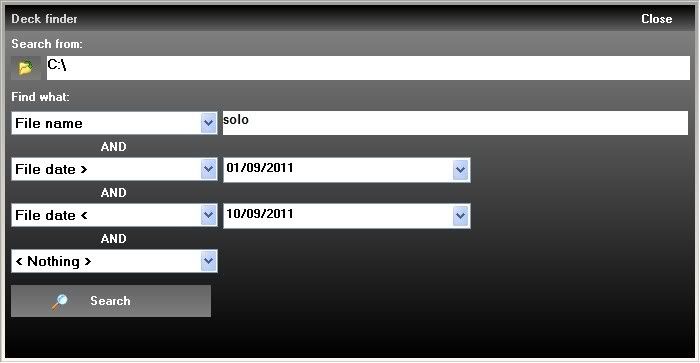
Finally, the new deck search criteria:
Probabilities where suggested by Shep, double-click bug and some spelling error was reported by Henning and generalized deck quantities were suggested by Manuel. Thanks to them for their support !
Many thanks to Drew of www.cardgamedb.com for the english scans of Journey to Rhosgobel.
Comments and suggestions are welcome !
Have fun !
Zorbec
nice tool!
Are you interested in german scans?
JanB said:
nice tool!
Are you interested in german scans?
Thank you for the comment
Adding new languages, for the textual parts of the DeckBuilder, would be too much work for the time I can spend for this development.
Yet, as the pictures are stored into single files, I may consider to have more languages available on the picture display only.
If you want to help in this way, please contact me on my email (it appears in the support page of the site, readme file or About box of the software). I will tell you what I need.
Thanks.
Zorbec
Hello, fellow Middle-earth travellers !
A new version of the LOTR LCG DeckBuilder for Windows is now available, with the missing features now implemented.
Here is a summary of the new things:
Note : The Hills of Emyn Muil scenario text is not available yet, the rest is Ok.
I will now give you screenshots to illustrate the main new features.
The new collection management page of the options screen:
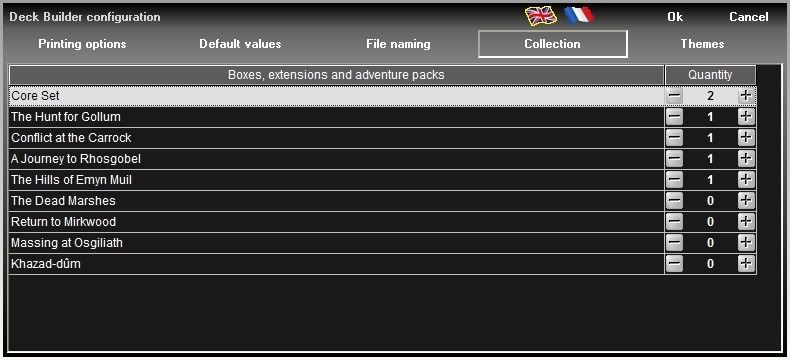
The new selectable column to display the card quantity in your actual collection:

Finally, the new export menu of the card screen:
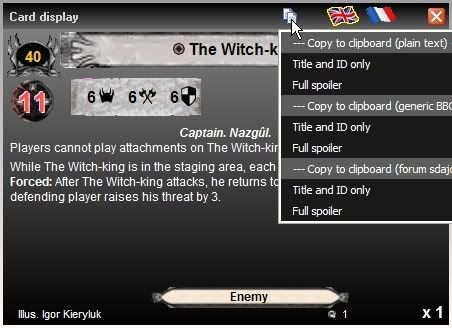
Many thanks to Drew of www.cardgamedb.com for the english scans of the last pack.
Comments, suggestions (and kudos ) are welcome !
Have fun !
Zorbec
Just donwloaded and tried the new version. Pleasure to see your program updated, as always. To set the quantities not on a per-card-basis but on a per-expansion/core set/adventure pack-basis is a good idea.
Thanks!
hey I emailed you and you said you didn't have time to make a LoTR deck builder!!!
YOUR AN ADDICT!! SEEK PROFESSIONAL HELP
(Not before you star the Star Wars one  )
)
Hello,
A new version of the LOTR LCG DeckBuilder for Windows is now available, with a little update.
Here is a summary of the new things:
Note : I completely forgot to input the changes of the last FAQ (1.2) and missed the publication of adventure packs rulesheets that will permit to input the scenario text without having to wait for my physical pack. I will correct this in the next release, sorry for the inconvenience 
Many thanks to Drew of www.cardgamedb.com for the english scans of the last pack.
Comments, suggestions (and kudos ) are welcome !
Have fun !
Zorbec
Thanks alot again!
Hello,
Finally, here is a new version of the LOTR LCG DeckBuilder for Windows, just in time for your Xmas 
Here is the list of new things:
Many thanks to Drew of www.cardgamedb.com for the english scans of the last pack.
Comments, suggestions (and kudos ) are welcome !
Have fun and a merry Christmas !
Zorbec
I can not get the new cards to show.. . I even compleatly deleted the app, downloaded 1.03 from the website, then insatlled the .dat file and still no return cards
EDIT
You need to go to the FRENCH part of the site for the update, it is stll the old version on the english page
Hello,
@booored : The web site links are correct (I always check them after updating the web site).
But some web browsers do not detect the update of a new page if you already visited it.
If you don't see the new version when it is announced, just press F5 to force your web browser to load the new page
Firefox has not such problems...
Cheers,
Zorbec
Is there any chance of a mac version? Is it programmed in Java?
Looks really good, this application, and I'd love to use it on my mac...