Character and Adventure Card Templates - coming soon...

By talismanisland, in Talisman

In answer to mmilli's post in the John Goodenough Interview thread, I thought I'd post news that I will be uploading templates for use with Photoshop, Gimp and similar imaging software to make characters and the like for the Revised 4th Edition of Talisman.

They'll be in PSD format with layers, but I'll probably chuck in some blank JPG files for anyone who prefers them.

I still need to add some bits to the Adventure cards, but they are more or less done. The plan is to post them to Talisman Island next weekend after a bit more time off for New Year!

I've posted this in a new thread as I don't want to get the questions mixed up with general discussion in the other thread.

I'll let you know as soon as they are available!
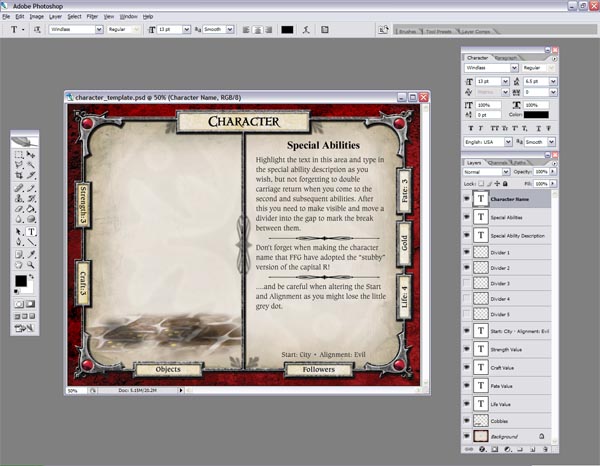
4re_character_psd.jpg

4re_adventure_psd.jpg

Awesome! Do you have a printing guide, too? Cardstock to use, etc.

I'll try to include as much detail as possible regarding fonts to use, sizes, etc.

What I will be doing to create new cards is what I did with BI's version. Using a "spare" copy of the game I will be using sticker paper to apply to real cards! I know it sounds like madness, but that way you cannot tell the new and old cards apart as you can with home produced cards.

The problem with the FFG cards is that they have a "linen" finish which you would have to try and reproduce if you wanted them to truly blend in.

4re_card_finish.jpg

I didn't really used to bother, especially in my 2nd Edition days when I was happy to have cardbacks created using a B & W photocopier! The thing is that when you have a number of additional cards in your deck you may know that it is going to be a new card coming up, but you don't know which particular card it is, which can add to the suspense!

For the moment, you can always check out a couple of tutorial from Talisman Island which were made by Hallow Knight and Cider Vampire for other editions. *NOTE* If you are using Cider Vampire's guide, the FFG Adventure cards are the same dimensions as 3rd Edition Adventure cards.

http://www.talismanisland.com/hallowcards.htm

http://www.talismanisland.com/cidercards.htm

Sticker paper on actual cards sounds like the way to go for the best quality. Now there is a reason for me to buy an upgrade pack!

talismanisland said:

In answer to mmilli's post in the John Goodenough Interview thread, I thought I'd post news that I will be uploading templates for use with Photoshop, Gimp and similar imaging software to make characters and the like for the Revised 4th Edition of Talisman.

Thank you for this, most kind to share with us! I was just about to rework my PSDs for the new FFG format... but I'll wait to see yours.

You can purchase "linen" paper. It has close to the same feel. Print the backs of the cards on that card stock.

Then print the action side on sticky paper and attach.

Ta-Dah!

Just a quick update to let people know I have not forgotten about the templates. I was about to start updating the download section of my site, but it's suddenly gone down mid upload!! I've no idea why, so hopefully it's just a small blip and they are restarting servers or something.

I'll post again when I've uploaded them.

characterscreeniegv0.jpg

...and, as if by magic, the site reappeared!

If you go to the downloads section of Talisman Island you can now download PSD templates for cards and there is also a download with PNG copies of the backgrounds, in case you use another method.

http://www.talismanisland.com/downloads.htm

I will be making some sort of tutorial for them, possibly tomorrow, but if you are familiar with the use of Layers, they should be a breeze to use.

Cardbacks and the like will follow when the tutorial is done!

thank you very much !

Awww just when I've perfected my process for creating chars! :)

Thanks for these will check them out asap.

And again... my great thanks! I'll be sure to mention your contribution in any creations I come up with.

I hope they are of use to people. I've not done the tutorial as yet, but I'll get to it. You will notice that the cards are set up to use my way of using stickers over existing cards, so they do not need to be "card sized". I will be posting another set with an outline to cut around should you want to print directly to card as soon as I've done with it.

You could also combine them (at least with the PSD version), providing crop marks layers for either sticker or card printing.

Yes, I'll be including something like that. Whatever I can do that works! happy.gif

That character art set as an example blends well with current 4th edition character art ,could it be a hidden preview of the pirate or rogue.gui%C3%B1o.gif

i'm waiting for the cardback and all the good work, all of you are going to do !!!

babeo.gifbabeo.gif

Lancer T said:

That character art set as an example blends well with current 4th edition character art ,could it be a hidden preview of the pirate or rogue.gui%C3%B1o.gif

Looks like a Jack Sparrow pirate to me. Note the cutlass and outfit. Even the black and white color scheme for his pants and headband is the skull and crossbones colors. I noticed that the reaper watermark has a skull but this expansion watermark is a little star. I wonder what expansion theme features a star...gee, could it be Timescape maybe?

Can't wait to play a Space Marine in the new addition. I wonder if they are going to add a new power like fate for the Timescape setting like tech points.

When I'm trying to modify Strength value PS says I lack "caxtonstd bold" font. I've installed everything from talismanisland. Any ideas?

If you can't get Caxton fonts to work (available from Talismanisland.com), another possibility is to download a freeware Talisman style font created by Sam Wallace at the Talisman Advanced site. Once you've installed it, and opened Jon's template, you will have to change the font for text manually. But Sam's font does work well and is indistinguishable from Caxton to the eye.

http://talismanadvanced.wikispaces.com/Official+Fonts


Oops! sad.gif

I forgot I had used one of the Opentype Caxton fonts too! I've now updated the zip with the other Caxton fonts.

talismanisland said:

Oops! sad.gif

I forgot I had used one of the Opentype Caxton fonts too! I've now updated the zip with the other Caxton fonts.

That did the trick. Thanks :)

Great job TI.

Small issue is that I thnk the "Expansion Symbol" is using opentype windings regular which I don't have (I do have truetype version)

I get a message about the missing font

Not a big deal as I can simplify the layer to an image.

That said, what is it for ? It is a pentacle.

Seeing as the layer is called Expansion Symbol, I guess it is supposed to represent the expansion that it belongs to, in which case I could make one up.

happy.gif

Yes, the expansion symbol is just representative, which will be explained when I can find the creative energy to make a small tutorial for the templates!

I think I'll try to do it over the weekend. The expansion symbol isn't really necessary for home made cards, but I thought it might be a nice touch if people had plans to make a new expansion or cards that might be themed on current/future expansions.