Online Custom Quick Build Card Maker

By J1mBob, in X-Wing

When the new app gave us access to all of the card graphics, I made a quick build generator that uses that art and overlays ship abilities and upgrades. Just paste your XWS into the form at this link:

http://infinitearenas.com/xw2quick/

...and hit Submit. Here are some examples:
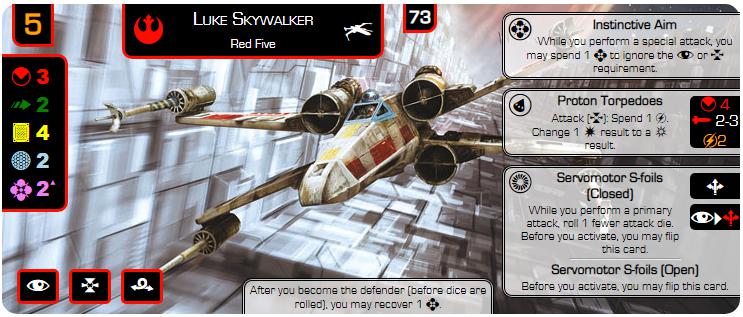
image.png.587cbd2fd3eec593a2b05b8cedeb10e2.png

Vader.PNG

Guri.PNG

Please let me know if you run into any errors. Note that the format breaks down if you have roughly 4 or more upgrades, since you run out of room on the card.

Thanks, and I hope you find this useful!

Edit: if you have more upgrades, you can switch to the “fat quick build” version:

Lando.PNG

infinitearenas.com/xw2fat (I plan to deprecate the xw2fat site; the fat layout is now an option in the xw2quick tool.)

Edited by J1mBob

Awesome! This will be great for quick build escalation tournaments! I'm also going to use these cards to teach my students to play X-Wing. I have been looking for something like this. Thankyou.

Any ideas of how to use this to make the quick build ships that break the standard squad builder rules?

It would be awesome if you figured out a way to make it work with more upgrades. I just made the Luke quick build card and it didn't all fit. It would probably work better if there was some space between the generated card and the generator itself. That way even if the text reaches below the card itself I can still clip it out without unwanted text.

Edited by Poultrybane

Thanks! I already had one forward work item: how to fit “fat builds” with more than roughly 4 upgrades in an aesthetically pleasing manner. But you also gave me another: how to make the “official” quick builds that break the squad building rules. I’ll take a look at both of those issues...

So those extended arts come out of the app? Amazing.

Where do you get an XWS file from?

56 minutes ago, saturnflight said:

So those extended arts come out of the app? Amazing.

Yes, I'm not convinced it was entirely purposeful, but the official squad building website allows access to very large format (roughly 700px x 300px) versions of the art at the top of every pilot card.

47 minutes ago, saturnflight said:

Where do you get an XWS file from?

XWS can be generated by third party squad builder websites like YASB 2.0 or phone apps like LaunchBayNext ( Apple or Android apps available). Unfortunately, the Official Squad Builder hasn't made it very easy to export squads in a convenient data-parse-friendly format.

15 hours ago, Poultrybane said:

It would be awesome if you figured out a way to make it work with more upgrades.

As a quick but imperfect fix, I put the card generating form above the generated card. Not aesthetically pleasing, but now if the upgrades run longer than the height of the card, you can choose to just cut an irregularly shaped card with the upgrades continuing down on the right side.

Edit: I just remembered that I set the form elements to be hidden when you print the card. So try using the "print" function within your browser and see if you can create a card with extra upgrades but no form text cluttering things.

Edited by J1mBob

Any way to get a threat level printed on there?

Just don't look at the chewbacca quick build.

This is really cool! Thank you for sharing!

First of all, this is awesome, great job! Also I second the threat levels as a check box option. Also not sure if this is a known limitation but it appears that you can only add 3 upgrades to each card? At least when I tried to add 4 to the Sabine attack shuttle it did not work. Thanks!

1 hour ago, agenttherock said:

...it appears that you can only add 3 upgrades to each card? At least when I tried to add 4 to the Sabine attack shuttle it did not work. Thanks!

This should now be fixed. Please give it another go!

8 minutes ago, J1mBob said:

This should now be fixed. Please give it another go!

Awesome! It looks like you can add more upgrades now but when they have a large amount of text or I add more than 4 they go outside of the edges of the quick build card, see the attached picture (not that this would be the best build, haha) Could have the text size go down with number of upgrades or perhaps have the border resize? no idea what would be best

Sabine.JPG

Edited by agenttherock
6 minutes ago, agenttherock said:

Awesome! It looks like you can add more upgrades now but when they have a large amount of text or I add more than 4 they go outside of the edges of the quick build card, see the attached picture (not that this would be the best build, haha) Could have the text size go down with number of upgrades or perhaps have the border resize? no idea what would be best

I’m glad you like it! Yes, this is a known issue. I’m looking at different ways to cram more upgrades on.

1 minute ago, J1mBob said:

I’m glad you like it! Yes, this is a known issue. I’m looking at different ways to cram more upgrades on.

Awesome!

As a quick fix, the user can generate 2 card imputs, with 3 upgrades each, the print both, and put 1 under the other with just the text boxes visible on the bottom one

Man, I really want to get some of these printed on decent card stock. Would there be a better option than Staples? Considering cost/quality/expedience?

Also, they seem to be a weird size that doesn't really fit normal printing options...

Does anyone have any suggestions?

Edited by Crit Happens
23 hours ago, J1mBob said:

XWS can be generated by third party squad builder websites like YASB 2.0 or phone apps like LaunchBayNext ( Apple or Android apps available). Unfortunately, the Official Squad Builder hasn't made it very easy to export squads in a convenient data-parse-friendly format.

As a total side note, would it not be possible to build a parser that with looks at the pdf or the website and the creates the XWS? I don't have the technical skills for it but it seems very doable.

Edited by Icelom
17 minutes ago, Icelom said:

As a total side note, would it not be possible to build a parser that with looks at the pdf or the website and the creates the XWS? I don't have the technical skills for it but it seems very doable.

I believe some kind devs are working that issue. I’ll see if I can fold in another way of getting the data into this card generator. But in the meantime, it is not all that hard to pull up YASB 2 and build what you want.

Erm… Entire XWS, a part or does it not like the Scyk (Hardpoint issue again maybe?) ? Trying this one and all I get is a # :

{"description":"","faction":"scumandvillainy","name":"Unnamed Squadron","pilots":[{"id":"quinnjast","name":"quinnjast","points":52,"ship":"m3ainterceptor","upgrades":{"ept":["juke"],"mod":["afterburners"],"hardpoint":["hardpointcannon"],"cannon":["ioncannon"]}}],"points":52,"vendor":{"yasb":{"builder":"Yet Another Squad Builder 2.0","builder_url":"https://raithos.github.io/","link":"https://raithos.github.io/?f=Scum%20and%20Villainy&d=v4!s!135:123,105,168:-1:-1:U.11&sn=Unnamed%20Squadron&obs="}},"version":"2.0.0"}

24 minutes ago, Hiemfire said:

Erm… Entire XWS, a part or does it not like the Scyk (Hardpoint issue again maybe?) ? Trying this one and all I get is a # :

{"description":"","faction":"scumandvillainy","name":"Unnamed Squadron","pilots":[{"id":"quinnjast","name":"quinnjast","points":52,"ship":"m3ainterceptor","upgrades":{"ept":["juke"],"mod":["afterburners"],"hardpoint":["hardpointcannon"],"cannon":["ioncannon"]}}],"points":52,"vendor":{"yasb":{"builder":"Yet Another Squad Builder 2.0","builder_url":"https://raithos.github.io/","link":"https://raithos.github.io/?f=Scum%20and%20Villainy&d=v4!s!135:123,105,168:-1:-1:U.11&sn=Unnamed%20Squadron&obs="}},"version":"2.0.0"} 

I cut and paste your XWS into the card generator and got a nice card out of it (I flipped the image to make it look nicer):

Quinn.PNG

Not sure why you didn't get the same...

Here's a link to the card generator with Quinn's card. Let me know if this works:

http://infinitearenas.com/xw2quick/?shipxws={"description"%3A""%2C"faction"%3A"scumandvillainy"%2C"name"%3A"Unnamed+Squadron"%2C"pilots"%3A[{"id"%3A"quinnjast"%2C"name"%3A"quinnjast"%2C"points"%3A52%2C"ship"%3A"m3ainterceptor"%2C"upgrades"%3A{"ept"%3A["juke"]%2C"mod"%3A["afterburners"]%2C"hardpoint"%3A["hardpointcannon"]%2C"cannon"%3A["ioncannon"]}}]%2C"points"%3A52%2C"vendor"%3A{"yasb"%3A{"builder"%3A"Yet+Another+Squad+Builder+2.0"%2C"builder_url"%3A"https%3A%2F%2Fraithos.github.io%2F"%2C"link"%3A"https%3A%2F%2Fraithos.github.io%2F%3Ff%3DScum%20and%20Villainy%26d%3Dv4!s!135%3A123%2C105%2C168%3A-1%3A-1%3AU.11%26sn%3DUnnamed%20Squadron%26obs%3D"}}%2C"version"%3A"2.0.0"}&opaqueboxes=checked&flipimage=checked&manualpoints=

Edited by J1mBob
Added link

Browser maybe? I'm using Edge (came with the OS, I'm on a satellite connection for internet so getting another might be an issue).

On 10/1/2018 at 8:48 PM, Hiemfire said:

Browser maybe? I'm using Edge (came with the OS, I'm on a satellite connection for internet so getting another might be an issue).

UPDATE 12/15/2018: I've changed the site to not use the URL for transmitting the build data. This should make the site more friendly for Edge browsers, @Hiemfire !

Yep browser. I've tested it on Safari, Chrome, and Firefox and verified it works on those. I just booted up Edge and got the # symbol. As I've dug into it, it looks like Edge truncates long URLs, which causes my JSON parser to fail. Here's a work-around: delete the optional information from your XWS so that it's short enough for the Edge browser. For example, taking the XWS for your Quinn Jast build above, remove the part I show with strike through:

{"description":"","faction":"scumandvillainy","name":"Unnamed Squadron","pilots":[{"id":"quinnjast","name":"quinnjast","points":52,"ship":"m3ainterceptor","upgrades":{"ept":["juke"],"mod":["afterburners"],"hardpoint":["hardpointcannon"],"cannon":["ioncannon"]}}],"points":52,"vendor":{"yasb":{"builder":"Yet Another Squad Builder 2.0","builder_url":"https://raithos.github.io/","link":"https://raithos.github.io/?f=Scum%20and%20Villainy&d=v4!s!135:123,105,168:-1:-1:U.11&sn=Unnamed%20Squadron&obs="}},"version":"2.0.0"}

So you have just this:

{"description":"","faction":"scumandvillainy","name":"Unnamed Squadron","pilots":[{"id":"quinnjast","name":"quinnjast","points":52,"ship":"m3ainterceptor","upgrades":{"ept":["juke"],"mod":["afterburners"],"hardpoint":["hardpointcannon"],"cannon":["ioncannon"]}}]}

Then Submit. That should work... let me know!

Edit: Seriously, I tested Scyks before I released this tool with you in mind! I knew you'd want to build some!

Edited by J1mBob
1 minute ago, J1mBob said:

Yep browser. I've tested it on Safari, Chrome, and Firefox and verified it works on those. I just booted up Edge and got the # symbol. As I've dug into it, it looks like Edge truncates long URLs, which causes my JSON parser to fail. Here's a work-around: delete the optional information from your XWS so that it's short enough for the Edge browser. For example, taking the XWS for your Quinn Jast build above, remove the part I show with strike through:

{"description":"","faction":"scumandvillainy","name":"Unnamed Squadron","pilots":[{"id":"quinnjast","name":"quinnjast","points":52,"ship":"m3ainterceptor","upgrades":{"ept":["juke"],"mod":["afterburners"],"hardpoint":["hardpointcannon"],"cannon":["ioncannon"]}}] ,"points":52,"vendor":{"yasb":{"builder":"Yet Another Squad Builder 2.0","builder_url":"https://raithos.github.io/","link":"https://raithos.github.io/?f=Scum%20and%20Villainy&d=v4!s!135:123,105,168:-1:-1:U.11&sn=Unnamed%20Squadron&obs="}},"version":"2.0.0" }

So you have just this:

{"description":"","faction":"scumandvillainy","name":"Unnamed Squadron","pilots":[{"id":"quinnjast","name":"quinnjast","points":52,"ship":"m3ainterceptor","upgrades":{"ept":["juke"],"mod":["afterburners"],"hardpoint":["hardpointcannon"],"cannon":["ioncannon"]}}]}  

Then Submit. That should work... let me know!

That worked. Strange that the Squad viewer works straight up but this one need the XWS edited to work.

On 10/1/2018 at 9:20 PM, Hiemfire said:

That worked. Strange that the Squad viewer works straight up but this one need the XWS edited to work.

I used a different way to input the data between the two. Squad Viewer passes the XWS straight into the parser, while this Quick Build tool passes it in indirectly via the URL. The reason I did it that way was to allow a Quick Build card to be shared via the (very long) URL. But I didn't know it would cause problems with some browsers. I'll see if there's some way I can use TinyURL or something to fix this...

UPDATE 12/15/2018: I've changed the site to not use the URL for transmitting the build data.

Edited by J1mBob