How to MUTE the sound in Vassal Armada

By MattShadowlord, in Star Wars: Armada

This may seem like a strange post since I was the person who provided the sound effects for Vassal Armada, but I expect some people will find it useful.

When playing the game, sounds really add something to it, but there are some times you're going to want to turn them off - like when logging someone else's game (and especially when logging several at the same time!)

Vassal doesn't muting built in, but there is a work around for Windows users.

  1. Right click on the speaker icon on the bottom right of the screen
  2. Select Open Volume Mixer.
  3. Scroll right until you find the Vassal icon.
  4. Click the small speaker below the volume control to mute it

Here is an image showing what this will look like; the volume should have the red crossed-circle icon.
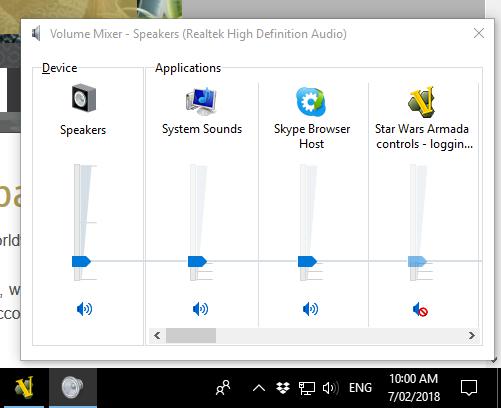
Image3.png.ca3420946e05fd2188abe2e5607b5392.png


Et viola, you can now use all your other sound, music and movies while logging files.

You can even play at work. :ph34r:

Edited by MattShadowlord

You’re not the hero we wanted... but the hero we needed... or something like that.

I will grant the anyone a free beer or two on whatever event we`re attending together if there is also a solution for MacOS.

Since there is no inbuild mixer tool I struggle for a long time now to find a suitable solution :-/

I've downloaded some mixer tools, but none of them provided me the desired function ... and I do not want to spend another 5 bucks for a tool which doesnt do the Job :-/

1 hour ago, Rocco79 said:

I will grant the anyone a free beer or two on whatever event we`re attending together if there is also a solution for MacOS.

Since there is no inbuild mixer tool I struggle for a long time now to find a suitable solution :-/

I've downloaded some mixer tools, but none of them provided me the desired function ... and I do not want to spend another 5 bucks for a tool which doesnt do the Job :-/

Handful of suggestions in this thread:
https://forums.macrumors.com/threads/application-volume.1650290/page-3

I'm not a mac user and therefore can't test them nor provide feedback, so good luck:
https://github.com/kyleneideck/BackgroundMusic
https://staticz.com/soundcontrol/
https://www.prosofteng.com/soundbunny-mac-volume-control/

Edited by rasproteus
or/nor: grammar is important, kids.

...but the sounds are so nice...pew pew sounds in space...don't turn them off :ph34r:

1 hour ago, Rocco79 said:

I will grant the anyone a free beer or two on whatever event we`re attending together if there is also a solution for MacOS.

Since there is no inbuild mixer tool I struggle for a long time now to find a suitable solution :-/

I've downloaded some mixer tools, but none of them provided me the desired function ... and I do not want to spend another 5 bucks for a tool which doesnt do the Job :-/

Delete the sound files...

that Sir, is tooo easy to think of!

and so far the best Idea :-)

I will simply write a batch file to rename them as long as not needed and then rename back.

Thanks a lot!!

I also find it useful to drop the volume down but not out. It makes it easier to play loud music by changing the PYAPOWWPOWPOW! into pyapowwpowpow

I like the intent of the sound files, but I only really like one of them: The "set" sound. It's distinctive, loud enough to be heard, simple enough to not distract from anything else etc, and it's short. You can use it as a simple "wake up" message if you're waiting on an opponent or to signal you're back from break without needing them to be at the screen.

4 hours ago, thecactusman17 said:

I like the intent of the sound files, but I only really like one of them: The "set" sound. It's distinctive, loud enough to be heard, simple enough to not distract from anything else etc, and it's short. You can use it as a simple "wake up" message if you're waiting on an opponent or to signal you're back from break without needing them to be at the screen.

I think if you delete the sound files from the Vassal module, you don't hear sounds (anyone can try this, but I'm not 100% sure).

AFAIK there was also a setting in the editor I played around with that let you choose between "send sound to opponent" or not (only devs should try this). I experimented with it about a year ago, but I can't really remember what my conclusion was :D