https://docs.google.com/spreadsheets/d/1ERAM_Akq3bmFJxBDbhuccoUciwbToVh12Hqep28SWkg/edit?usp=sharing
Update: Version 1.2
- Active Side Missions and Rebel Side Mission selection now gray out when playing a mini campaign.
- Cleaned up some errant conditional formatting
- Added The Boon and Bane cards to the Data sheet so that they can now be selected as earned rewards on the Rebel and Empire sheets.
Update: Version 1.1
- Another column in the Dashboard to input additional Influence gained by the Imperial player.
- Changed Crate column to "Extra Credits x50" and made it 0-14. Also added instructions on the side for this column. Don't want people to go adding in the bonus credits they get at the end of the mission for accomplishing an optional objective because that's already calculated in there.
- A section in the Empire sheet where the Imperial player can track extraneous Influence spent.
- Added slots in the Rebel sheet for more sold items.
- Rebels can now keep track of Bounty tokens on the Rebels sheet. This will also cause their names on the Dashboard to light up in Fuschia.
Original Post 11/17/17
As someone who's stuck with an iphone at the moment, I got jealous of the sweet campaign apps that Android users have access to. After switching from Android to Iphone, I really missed having a mobile app that tracked all my campaign results automatically. I started looking for spreadsheet based trackers for Imperial Assault that could be used on mobile with the Sheets app, but most of the ones I found either weren't automated and were just digital versions of the back of the campaign book, or they were not mobile friendly due to having a ton of sheets to navigate or having very spread out layouts. After using @Thraugs awesome Corellian Conflict Manager, which worked quite well on mobile with the Sheets app, I was inspired to try and do something similar for IA. I took it as a challenge to improve my very basic Excel skills and create something cool for the community. FYI, I'm not a programmer or an excel expert, I had to do a ton of googling to figure all this out and took a ton of initial design inspiration from @Thraug's sheet, as I had spent the summer trying to understand how it worked it to make an early update for the new Armada ships.
So here's what I wanted out of a campaign tracker:
- Easy to use, with as much automation as possible. I want to be able to input results while riding the bus or on my lunch break after the mission without having to pull out any books.
- Mobile friendly. As few sheets as possible, compact layout.
- Device agnostic. PC, Tablet, IOS, Android, whatever. Google sheets is pretty ubiquitous I think.
- Retains usefulness even without updates or corrections. Allow users to fill in the blanks with custom values and correct errors on the fly without having to wait for an update from the developer.
- Make the sheet easy to update for new content.
And here's the features I was able to implement after many weeks of work and tinkering:
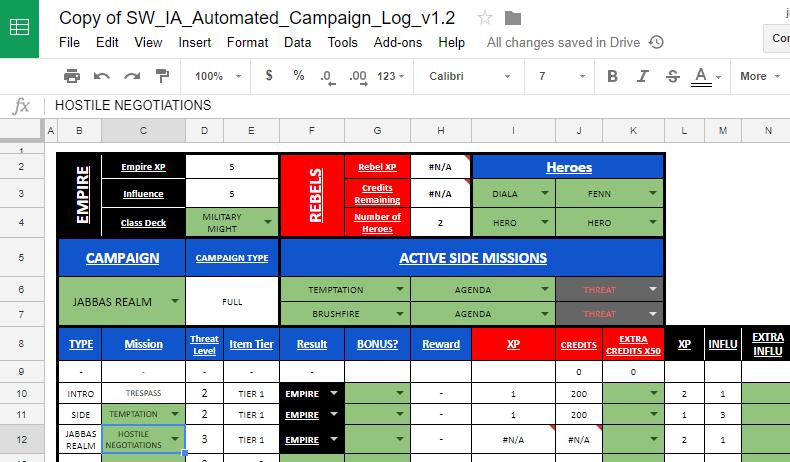
- Full implementation of all existing campaigns on a single sheet that morphs depending on the campaign you choose. Includes Heart of the Empire as well as support for my own Edge of Oblivion mini campaign as well as blank campaigns for custom campaigns and custom mini campaigns.
- Only 3-sheets to navigate, a Dashboard with cursory overview of player resources, general campaign info and mission progress tracker, and two sheets that show detailed overviews of the Imperial and Rebel players resources and expenses. Each sheet is also compact and easy to navigate on a mobile device.
- Full automation for tracking resources that accounts for all mission specific rewards, including accounting crates and bonus rewards # of Rebel heroes, as well as deductions for upgrades purchased and upgrades that are discarded or sold. Players don't need to know how much anything costs, it's automatically filled out by the sheet. All costs are visible so users can double-check the math on their own.
- Drop-down menus that self-populate based on selections you make elsewhere on the sheet, such as only choosing Active Side Missions based on the missions in the Side Mission deck and the Agenda cards purchased by the Imperial player, and mission dropdowns pull from only from missions that would be available based on the story being played and the side missions available. Drop-down menus also show grey when they cannot be selected, like when a weapon doesn't have enough mod slots or when a player has no resources. Basically players don't have to know the name of anything from memory.
- Cells that turn black and red when a mistake has been made, for example if a player buys more upgrades than they can pay for or if the Imperial player buys a mission Agenda card without updating the Active Side Missions queue.
- Secret Agendas cause their cell to become hidden with black-text-on-black-background to hide from prying eyes. A user can click on the cell to reveal it of course, just like spoiler text on a forum.
- Color Key and simplified Sheet Tutorial are on the Dashboard but off to the side.
Not everything is completely automatic though:
- Rebel players will need to select their starting weapons, but this is made easy by clicking on the cell and typing the hero's first name, which will show you their starting weapon to select.
- When you sell or discard an upgrade, don't just delete it, make sure you put it in the proper queue so the sheet can continue to track the resources you spent on it initially.
- Players will need to select the next mission, but will still be limited to the possible selections at that point in the campaign, so when going into an Interlude for example, there will only be one mission to choose from, but in Heart of the Empire you will have 3 missions to choose from for a story mission.
And finally, I should mention that the sheet naturally has a lot of calculations going on behind the scenes to make all this work, so there is a potential for a slow down. I tried to keep the engine that powers the sheet somewhat organized, but as I was learning a lot of this stuff as I went, some of the backstage stuff got a little messy. I might come back and try to make those a little bit more organized, but for now everything seems to be working. Be warned, while you can update the sheet's engine on your own by going into the two hidden sheets, Data and Calculated Data, changing things in there without knowing what your doing will probably lead to cascading failure through the rest of the sheet.
So there it is, my ambitious little pet project. It ended up being way more work than I had expected, but also a ton of fun to learn and then write each function and then see it finally work the way I wanted it to. I'd really like to know what people think and get feedback, especially from people using mobile devices how the sheet works for them with the Google Sheets app, but also people using it on desktop. I am concerned it may be prone to crashing, but it's been okay on my phone so far. And of course if there's any upgrades missing or calculation errors, please let me know. I was pretty exhaustive in making sure I got all of the rewards and bonus rewards right for each individual mission, but there is a ton of content in the game and there was plenty that I missed on my first few builds.
Oh yeah, here's the link: https://docs.google.com/spreadsheets/d/1M3vNoZDMwAJIrr3ON_iF_wkC8bbDR6TJKrQNlVOMiBU/edit?usp=sharing
The link is view only, you'll have to save a copy to your Google drive by clicking File -> Make a Copy before you can use it. Also do not change anything in the sheet that isn't shaded Green, or else things will probably get screwed up.
Edited by Tvboy