Came across this guide earlier, figured it might be useful to people here:
https://www.warhammer-community.com/2016/11/13/the-model-photo-how-to-photograph-models-for-display/
Came across this guide earlier, figured it might be useful to people here:
https://www.warhammer-community.com/2016/11/13/the-model-photo-how-to-photograph-models-for-display/
Cool. I honestly wish more people would set up a background. They do this gorgeous repaint then photo it on their workbench with the morning's mug of coffee.
I got a black cloth remnant for about a buck and then splattered it with white, yellow and red for stars.
I will actually say that flash can work for starships. . .the highlights and shadows work well. In fact, this technique was used for Battlestar Galactica in the '70's. There were no colors beyond light gray for the capital ships--harsh lighting was used to give coloration and texture.
A comment on zooming: It only works with OPTICAL zoom. If you're using a "digital" zoom all you are really doing is taking the picture you'd normally get and then cropping it down before you even save the picture. If you ever look at your pictures at "full scale" you may notice that using the zoom on your phone and other devices means you end up with a smaller picture; that's because they take the big picture and just save part of it.
If you're going for a uniform experience every time you photograph a model then the "studio" like suggestions they are offering is for the best. If you're just shooting one model some things are less important but you still want a clean background with the model in focus and well positioned.
Tip:
- Get a matte black paper for background
- Poke holes in it with a needle
- Shine a light behind the background aimed towards your camera
- Change your aperture setting to control the size of them dots
- ???
- BOKEH!
If you are using desk lamps and want to get a properly black background it helps (if the bulb is recessed enough) to put a piece of plastic or cardboard with a smaller hole in the middle to restrict the cone of light to a smaller spot or just use a flat surface to block light spill from hitting your background.
If you already have a camera with an external flash unit - get one of these bad boys. It's a super lazy lighting rig that requires you to mess around for a few shots until you find that one setting of Aperture / ISO / Flash power and then you never have to change it again. 
Since it is a ring that hits the model from all sides if you get close enough, it will make your paint jobs shine revealing all the sweet details you painted a bad lighting setup would hide in a shadow.
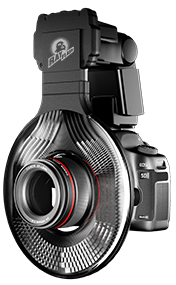
You might be able to get the same effect if you buy a cheaper LED macro ring light.
Something like Apurture Amaran Halo 100 costs around 60 USD. Though I found their lights to be a bit too orange compared to a properly Daylight balanced light.
If your camera has a custom white balance setting option, you can shine the light you are using at a white or med-gray background and have the camera setup the white balance based on what it sees. Or you can dial in the specific value in Kelvins.
Alternatively you could make a ring out of some LED strips and light with that.
Noice.
Look at Micro Mark on line catalog. They carry a portable lighting set-up that comes with lamps, diffusers and back drops. Runs +/- $100 US. Everything folds up into a package about the size of a small attache case.
If you need a bigger set-up, build a frame from 1/2" pvc. Plain cloth from Joann's Fabrics will supply the backdrop. Judicious use of cement will allow it to be taken down and stored in a small footprint.
If I remember, I'll photograph the one I bought and the one I made and post the images.
On 9/6/2017 at 3:07 AM, Polda said:Tip:
- Get a matte black paper for background
- Poke holes in it with a needle
- Shine a light behind the background aimed towards your camera
- Change your aperture setting to control the size of them dots
- ???
- BOKEH!...
Bokeh danger: When you start closing down your aperture you may take your nice little round "stars" and get them into other funny shapes. Certainly more of a problem with some lenses than others but I'm thinking every has seen the hexagonal lights in the back of pictures before.
Of course that now offers another strange possibility. Create your own custom aperture in the shape of say the Rebel bird or Imperial gear and tape it over the front of the lens and now all of those out of focus lights in the back may be taking some different, but distinctive, shapes. I'll admit I'm not sure how well it would work with more complex shapes but it certainly can work with other shapes.
On 9/7/2017 at 3:45 PM, Stoneface said:Look at Micro Mark on line catalog. They carry a portable lighting set-up that comes with lamps, diffusers and back drops. Runs +/- $100 US. Everything folds up into a package about the size of a small attache case.
If you need a bigger set-up, build a frame from 1/2" pvc. Plain cloth from Joann's Fabrics will supply the backdrop. Judicious use of cement will allow it to be taken down and stored in a small footprint.
If I remember, I'll photograph the one I bought and the one I made and post the images.
Why did the James Bond theme just go thru my head??
4 hours ago, Darth Meanie said:Why did the James Bond theme just go thru my head??
1) You just watched a Bond flick.
2) You're a conspiracy nut.
3) You had one of those "spy cases" when you were a kid.
1 minute ago, Stoneface said:1) You just watched a Bond flick.
2) You're a conspiracy nut.
3) You had one of those "spy cases" when you were a kid.
Where's option Q)?
Just now, Darth Meanie said:Where's option Q)?
That's #3. I'm pretty sure that after the first or second Bond film was released some toy company recreated the attache as a toy for kids. Of course I'm old and the memory does play tricks from time to time so I could be wrong.
1 minute ago, Stoneface said:That's #3. I'm pretty sure that after the first or second Bond film was released some toy company recreated the attache as a toy for kids. Of course I'm old and the memory does play tricks from time to time so I could be wrong.
It's probably from my roleplaying days of Top Secret. I think all our characters toted a "spy's attache case."
More on post, I really gotta try the pin poke bokeh effect.
1 minute ago, Darth Meanie said:It's probably from my roleplaying days of Top Secret. I think all our characters toted a "spy's attache case."
More on post, I really gotta try the pin poke bokeh effect.
If you have a camera, try using a "star effect filter". It has fine crisscrossed lines that turn a pinpoint light source into a starburst. Probably can be done in Photoshop but I'm old school. IIRC the filters came in 4, 6, and 8 point starbursts.
1 minute ago, Stoneface said:If you have a camera, try using a "star effect filter". It has fine crisscrossed lines that turn a pinpoint light source into a starburst. Probably can be done in Photoshop but I'm old school. IIRC the filters came in 4, 6, and 8 point starbursts.
I have a 35mm digital. Is that a lens adaptor? Kinda like getting a polarized lens cover?
13 minutes ago, Darth Meanie said:I have a 35mm digital. Is that a lens adaptor? Kinda like getting a polarized lens cover?
Some come like polarized filters where you can turn the outer bezel to change the orientation of the stars. Others are larger pieces of square plastic that fit into an adapter that does the same thing. The ones using the plastic squares can usually take two different filters so you can stack effects. Like a blue filter and starburst to shoot the sun and have it appear like night.
I think the plastic squares are more cost effective if you have multiple lenses with differing bezel diameters. The carriers are relatively inexpensive to buy rather than same filter in multiple sizes.
I should be able to post pics Wednesday of the portable studio and the filters if I can figure out how to get them on the forum.
Edited by StonefaceOn 9/11/2017 at 10:25 PM, Darth Meanie said:I have a 35mm digital. Is that a lens adaptor? Kinda like getting a polarized lens cover?
I believe starbursts are a relative of lens flare which is usually something you try to keep to a minimum.
Looking them up is looks like UV filters with a layout of scratches already on them to give the burst pattern. I guess there are other ways of getting the effect but that is what it looks like the filters do.
Here's my question: How come I can't upload anymore pictures to the forum?
8 minutes ago, Darth Drago said:Here's my question: How come I can't upload anymore pictures to the forum?
With the addition of all the Showcase threads, I thought that this would probably be a good thing to have on the front page!
-DD