Tabletop Admiral Updates Thread

By werdnaegni, in Star Wars: Imperial Assault

Just looking at this for firs time, looks good.

Can I ask- I have removed the packs I dont have in the top section, all good to go to pick my force but I have 1 query, when it comes to command cards, I can only see Command Cards from expansions I have bought. Does it show the cards from the core set (the zero cost ones) anywhere?

Thanks

On 5/24/2017 at 9:26 AM, VAYASAN said:

Just looking at this for firs time, looks good.

Can I ask- I have removed the packs I dont have in the top section, all good to go to pick my force but I have 1 query, when it comes to command cards, I can only see Command Cards from expansions I have bought. Does it show the cards from the core set (the zero cost ones) anywhere?

Thanks

Sorry I'm just now seeing this.
I don't know if I'm understanding your question correctly, but are you saying it's not showing core set command cards for you?

It should be showing those, so if it's not, let me know and I'll see if I can figure out what's going on.

On 5/24/2017 at 5:03 AM, Isnigu said:

Hey, awesome website! I use it all the time.

Feedback: Scavenged weaponry seems slightly borked. There are two in the list, and if you add one you automatically get the other aswell. You can remove the extra again without an issue, but it doesn't seem intentional.

The + button is currently underneath each card. I seem to recall these being to the side, making the list a lot shorter and easier to navigate. Any chance of this being changed back again?

Certain, very specific screen sizes will cause them to rearrange in a non-ideal way. Nothing has changed on my end though, so maybe your phone/monitor is in that non-ideal range. If you're on your computer, try slightly resizing your window. I know that's fiddly but it's behaving weirdly. I need to look into it.

As for Scavenged Weaponry, I added that twice on accident, and that should be fixed now. It may have broken some lists, so sorry about that if it did!

Edited by werdnaegni
2 hours ago, werdnaegni said:

Certain, very specific screen sizes will cause them to rearrange in a non-ideal way. Nothing has changed on my end though, so maybe your phone/monitor is in that non-ideal range.

On all my monitors (home, work, laptop) it used to display the button on the side. Now it displays it underneath every time. No amount of resizing windows alters this.

2 minutes ago, squirrelfox said:

On all my monitors (home, work, laptop) it used to display the button on the side. Now it displays it underneath every time. No amount of resizing windows alters this.

That is really weird. I can't get the buttons to go under no matter how much I resize.

What browser are you using? Maybe one handles things differently and I need to do some adjusting.

44 minutes ago, werdnaegni said:

That is really weird. I can't get the buttons to go under no matter how much I resize.

What browser are you using? Maybe one handles things differently and I need to do some adjusting.

Same with me on Chrome - whether at work or home or on my phone, the + button is always on the bottom of each line now.

Hm. Its a long shot but maybe clear your cache? Could be an old css file it's pulling from.

If that doesn't work I guess I can shrink the buttons a little.

4 hours ago, werdnaegni said:

Sorry I'm just now seeing this.
I don't know if I'm understanding your question correctly, but are you saying it's not showing core set command cards for you?

It should be showing those, so if it's not, let me know and I'll see if I can figure out what's going on.

Sorry I have checked again and its working fine now!! None of the Core Set Command Cards that were zero cost were showing....but all there now thanks!!!

2 hours ago, werdnaegni said:

Hm. Its a long shot but maybe clear your cache? Could be an old css file it's pulling from.

If that doesn't work I guess I can shrink the buttons a little.

Cleared the cache and it worked! Thanks for your hard work. Sweet site.

Cleared my cache, no difference. Tried resizing, no cigar either :(

3 hours ago, Isnigu said:

Cleared my cache, no difference. Tried resizing, no cigar either :(

Sorry to hear.

What browser are you using? Any extensions/add-ons/whatever?

And if you feel up to it, a screenshot wouldn't hurt.

Sorry again that it's not acting as it should.

I'm not seeing the Neutral card (Trusted Ally I believe it is called) that came with BT-1 and 0-0-0. Wondering if that is a cache/display issue on my end or if it hasn't been added yet.

Edited by leacher
20 hours ago, leacher said:

I'm not seeing the Neutral card (Trusted Ally I believe it is called) that came with BT-1 and 0-0-0. Wondering if that is a cache/display issue on my end or if it hasn't been added yet.

I seem to be missing a few from that pack for whatever reason. You're not the first to point one out. I'll look through them all today and see what's up. Thanks for pointing it out.

Oh I guess it's because the images were never spoiled. I'll have to find a way to get my hands on it, since I don't actually own it.

If anyone could conveniently scan it for me, that would be great. Or at least type up the text so I can add it.

Just added it. Thanks again.

I'm not able to log in for some reason

6 hours ago, Ken on Cape said:

I'm not able to log in for some reason

Can you tell me more?

A few people have tried to log in using their email address instead of their username, so make sure you're not doing that. And for some reason error messages aren't working so if you're getting your password wrong, it won't actually tell you, but if it doesn't log you in then it's 99% getting your credentials wrong.

But let me know your account name and I'll look into it.

I was trying to use my email, my fault sorry.

No problem, glad it worked!

I noticed that the skirmish upgrade, "The Generals Ranks" is missing. Its from General Sorin's pack I believe.

actually i'm just dumb and didn't have that pack selected

Edited by wannabepudge

@thereisnotry & @werdnaegni , I looked into making an excel macro for vassal and another list builder, but the problem I found is that the cards have ID numbers associated to them that only the vassal DB knows about. So without knowing that ID for each card, doing the mapping wasn't going to work. Also, that save file is full of unused fields which makes it super messy.

20 hours ago, wannabepudge said:

@thereisnotry & @werdnaegni , I looked into making an excel macro for vassal and another list builder, but the problem I found is that the cards have ID numbers associated to them that only the vassal DB knows about. So without knowing that ID for each card, doing the mapping wasn't going to work. Also, that save file is full of unused fields which makes it super messy.

Yeah, the person who made the Vassal module showed me the code involved, and it just looked like a nightmare. If somebody figures it out though, I'd be happy to implement it, I just can't interpret it with my small human brain.

@werdnaegni , it appears that Terminal Protocol is missing as a command card. It comes in the BT-1 and 0-0-0 pack:

Courtesy of Boardwars:

Command%20Cards&i=Terminal%20Protocol.jp

1 hour ago, wannabepudge said:

@werdnaegni , it appears that Terminal Protocol is missing as a command card. It comes in the BT-1 and 0-0-0 pack:

Courtesy of Boardwars:

Added. Thanks for the heads up.

@werdnaegni

Thanks for the updated cards!

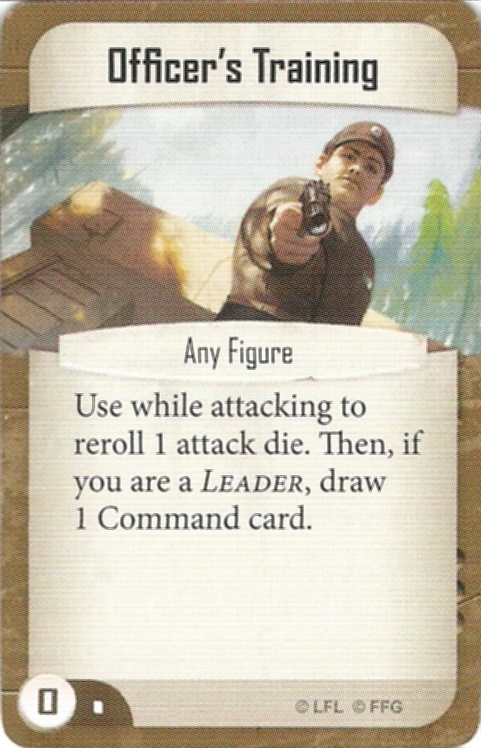
Looks like the command card Officer's Training is missing.

Officers%20Training.jpg