Video recording equipment

By Sephlar, in X-Wing Battle Reports

I would like to start recording matches at my home store. I am seeking advice from those who have done this. I have access to the software to clean things up after (I have an Adobe Creative Cloud account as I am a Graphic Designer). My biggest concern at this point is buying the correct equipment to record the raw video, namely the camera and hardware to mount it.

I am presuming a GoPro given all the amount of accessories available on the market. And I am presuming that one does not need the latest and greatest since I'm not capturing cars or people or scenery that is flying by at 100 miles an hour.

But I don't want to go cheap or get something that will be outdated in 6 months and no longer supported.

Any help or links to how others have done it will help. I've done some internet searching but any advices and guidance from those who have done this would be awesome.

My plan at this point is to start recording our weekly game night, maybe a match or two, two weeks from now (or longer if tracking the hardware is difficult). More as a beta test. Leading up to our store championship in March.

Edited by Sephlar
I don't think you can go far wrong with a GoPro. I have a Hero 3+ and it's still supported with software upgrades from the website. All of the accessories are compatible and you can even download the free GoPro editing suite. Another little bonus is that if you download the app and have access to WiFi you can control the camera from your phone.

Yes. I'm thinking Hero 3+ Black. My biggest questions are mounting setup & how to handle dice on one camera. I like how some people (including the worlds coverage") use a close up dice tray.

Also... If I am recording at 1080p how much memory do I need to get a full 90 minutes? (Enough to cover a 75 min match).

And can the camera be plugged into an AC outlet while it is filming, so I'm not replying on battery life?

The battery life is plenty for a couple of matches in a row, from my experience. I have used a 64 GB card in the Hero 3 and battery life always fails before the memory fills up. Your biggest problem is likely to be heat if you use the case. You may want the open Skeleton Case, but it is an extra $50. Are you wanting audio or not? As for doing a closeup, you would want a separate camera or just roll on the table... the definition will be easy enough to see at that close range.

Newegg has a number of vendors with package deals and I'm trying to pick something with 2 memory cards (64gb each) and most of the packages have 2 or 3 extra batteries (which seems like overkill but maybe not over the life of the camera?)

I have seen where the dice are super oversized in icon form at the bottom left and right of the screen after modifications. So I could probably do something there. Because I am a graphic designer, I really want the post production work on the video to have polished and professional graphics and icons that any Xwing player will immediately recognize and understand in a way that it fits with the theme of this game. I've also seen good videos of matches for Xwing that bring up card images when specific abilities from those cards are used so that others new to the game or just new to that card... will also get to see an ingame example of the card being used.

Since I'm planning to use some kind of tripod stand (to keep camera still) and its indoors, I'll have to see what I can do.

Can the have a room mic plug into camera?

Edited by Sephlar

Are you planning on editing the video after the match or doing any kind of live mixing of video? If you want to live mix, you'll need something like a Tricaster MiniHD. I think you can plug a GoPro in through the USB while shooting to keep it running on external power, but I'm not 100% sure on that. As for rigging, the most stable is probably a C-Stand with an extension arm - they run around $100 for a cheep one, but you won't find anymore more stable (look up how to set them up, and get a sandbag or two).

Audio is the part that most people forget - I'd recommend either a Zoom H1 or H2n to record the ambient sound of the match - either one should be able to be mounted above the table with the camera to get pretty good audio.

I don't have any interest at this point of doing live casting. Simply recording the matches and going back the next day (or after) and adding graphics and audio commentary.

So, with a GoPro Hero 3+ Black edition, I can't confirm a mic input. Does anyone know? Or will the mic that is in the GoPro unit suffice for ambient sound?

Obviously I will fade it down so that the audio commentary is up front and I'm thinking I csn add some sound effects for hits when shields/hull damage is being recorded and dice roll sounds when the dice are rolled and the graphics for the dice results are displayed.

Edited by Sephlar

There's a mount you can pick up for the GoPro called a Frame. It's essentially the bare minimum you need to mount the GoPro to a tripod. It also gives you access to the ports, and opens up the two built in mics to ambient. Downside of it is, you lose all protection from the case. Given the circumstances (inside, controlled environment, not exactly a high risk area) you're fine to do so. It'll also help with keeping the camera cool over long recordings (it will get hot, no matter what. With the Frame, at least, it won't overheat and cut out). Bear in mind that, even with the Frame, the audio won't be stellar. You'll get discernible speech/sound, but you'll get a lot of ambient, and possibly some echo/tunneling. There's no mic-in option for the camera (if you want high grade audio, pick up a cheap Zoom audio recorder and mount it near the cam, then sync them in later).
Any decent USB charger above 1A will power it. I've run mine (a 3+ Black too) off an Anker battery pack for most of a day, strapping the pack to the tripod for convenience (for no other reason than to keep it wireless). I'd also recommend a high capacity card (I use 128GB just to take advantage of the 1080/60 capability), but also ensure you get one that's at least Class 10/UHS-1 grade; there's no point in having the capacity if the transfer speed isn't fast enough.

I've been thinking of doing something similar recently for an upcoming tourney here. The dice results were also a question I was trying to answer. Beyond just recording them, it's hard to have any indirect control. The best method I've seen was from the FFG Twitch casts at Worlds, where the dice were rolled in a specific tray, with a camera mounted overhead. Depending on your angle, you could pull this into the shot, but if you're just looking for a way to record them so you can display accurate graphics later, maybe just recording the results in a notebook would suffice.

Take a look at the Hero 4 Session. It's a smaller, lighter GoPro that doesn't cost as much. The trade-off is that it's not quite as waterproof/shockproof. The only other downside is that most of the controls are operated via Wi-Fi through a smartphone or tablet. But it could be a cheaper alternative, and the light weight and small size might make it easier to mount above the table.

@NakedDex... I'm looking at the possibility of a GoPro4 Black. It has a mic plug. I'm also considering the Drift Ghost-S. It's considerably cheaper than the gopro but has every feature I want from the gopro hero4 black other then some of the ultra high 4k resolution video. I am presuming that for indoor gaming on a tripod of some other sturdy mount, 1080p @ 30fps is going to work just fine. The big advantage of the Drift Ghost-S is the batteries last roughly 3.5 hours on a full charge (although you can remove/exchange them between games like the hero4 black). AND if I do the dice try at some point, I can pick up a second camera and the two will record in tandem. In fact, you can actually run software on a laptop that will allow up to 5 Drift Ghost-S cameras to be run from the software and switch to various camera angles. And it looks like there are aftermarket mounting pegs for the Drift Ghost-S to use all the gopro mounts and such.

@MortalPlague ... I took a look at the Hero4 Session and while the price is nice, the issue that worried me was the battery does not come out. When it runs out, your camera is down until it's charges up again. Removable batteries are probably a must to have spares ready to go, on hand; for those times you don't have access to an AC outlet or some other means of charging. ALSO over time when the battery deteriorates replacement is not as easy or cheap. Also no mic plug in session.

So now I will try to do more research on Drift Ghost-S (reviews and accessories). I thank everyone for the input and suggestions so far. If anyone has anything to add OR if you know much about the Drift Ghost-S? Let me know.

Particularly anyone who does recordings themselves of game matches and has any suggestions for both cameras, accessories, or just production itself.

I have no experience with the Drift Ghost-S, but it does seem to be ticking the boxes for you. I've owned several GoPros over the years, and have found them to be bulletproof (there's a reason they've become the industry standard for a small form factor HD camera). If you're just buying into the system, the GoPro can be a little daunting in price. As I said, the way I run mine for long indoor shots like these games, is usually by hooking it to a battery pack (the Anker pack I use cost me about $25, and lasts pretty much a whole day). Works great, keeps it wireless, and keeps it fairly cheap.

Maybe check out the market for 2nd hand units? Speaking for the GoPro's at least, they can take all kinds of hell and still work perfectly, so most used units are actually just fine, and many users upgrade when the newest cameras come out.

One thing I'd suggest, that's often overlooked for things like this, is to look into lighting. For the most part, these types of cameras (the Drift included) have fairly wide ISO bands in which they can give good quality, so poor lighting isn't too much of a problem usually, but for the sake of definition of the ships, and reading the tokens/dice, a small light mounted by the camera on a superclamp would really help a lot. Doesn't have to be super bright, or even a professional bit of kit. I've improvised ring-lights for these kind of applications in a pinch before with kitchen LED strips from Ikea.

So, NakedDax, it sounds like you've recorded some matches using a tripod? That is probably my biggest concern is mounting the camera so that it gives the best birds eye view... Not perfectly over the top, but mostly over the top so that I can utilize the slight angle on either side for each opponents squad detail.

The more I look at it, the more I'm probably just going to go with the GoPro Hero4 Black, knowing that it's not cheap but I should not have any issues with compatibility with accessories or finding them. Also, the best hardware sound last the longest before the technology is so surpassed its time to upgrade.

Edited by Sephlar

Not of X-wing (though I plan to), but I've worked with GoPros in a lot of very odd situations, to the point that X-wing would be relatively mundane.

The angle is pretty wide on the lens, so you shoudn't need to go too high. The higher you go, the further out you'll want to extend over the game area (wide angle lenses have a decompression issue by their nature, which is only exacerbated by distance and angle, so going high up and staying off to the side isn't ideal).

Depending on how you want to do it, you can pretty easily use a boom mic or light stand with a thread adapter on the end (camera threads are 1/4", but mic threads are usually about 5/8". The adapters are generally very cheap). They're stable, and you can get plenty of height and angle on them to suit. A regular camera tripod won't really give you much extension beyond vertical, and they're also usually a lot more expensive than your average light stand or mic stand. They'll give you a lot more flexibility in getting the right shot for you, without getting in the way of players.

Oh!!! A Boom Mic stand looks perfect. I think I have what I need to purchase the initial equipment. After looking up a few boom stands, NakedDex, that was the big solution I was missing. I knew that a normal camera tripod was not going to help me as much.

I got a package deal on a Hero4 Black with some mounts I can use for other (secondary) uses I can use the camera for PLUS a GoPro branded BacPac battery for extended recording and a nice boom stand. I may pick up a higher quality 64gig mSD card.

I recommend SanDisk or Lexar cards. I've been using SanDisk especially for my DSLRs since switching from film, and I've never had a single card fail. Not massively expensive, either. Whatever size you get, just make sure it's a UHS-1 card. Trust me, you'll need the bandwidth with something like a GoPro. They have a good size buffer, but it'll choke in seconds at 1080/60 if your card isn't fast enough.

I got a good deal on some Samsung micro SD cards last summer on Amazon. Perfect for the GoPro, and seem decent. I haven't used them enough to recommend them over the SanDisk, but if they're anything like their SSDs, they'll be rock solid.

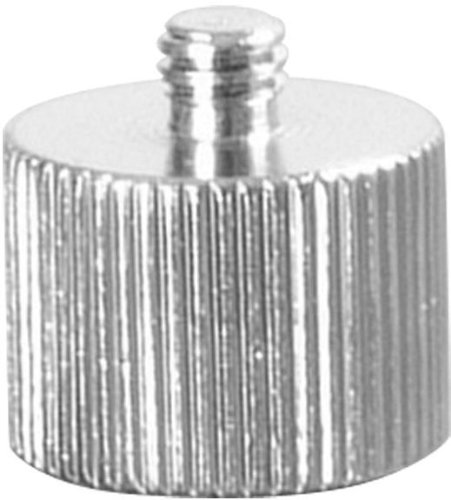
Just be aware with those boom mic stands, you'll need an adapter screw to Bo from the 5/8" mic screw, to the 1/4" camera mount screw. You could also wing it with one of the sticky mounts it ships with, and some creativity, if you're stuck.

I'll come up with something for the mounts. It says it comes with adapters but if it's not the one I need for the GoPro I'm sure a camera store locally can point me in the right direction.

I have two Samsung SSDs and they rock. One in my suped up desktop for graphics design (and gaming of course) and one in my notebook that I upgraded. I'll never go back to spinning hard discs again for boot/program drives.

Yeah that's the one. Simple enough bit of kit, but surprisingly hard to find in brick & mortar stores.