GM Aids?

By Intys Rule, in Star Wars: Edge of the Empire RPG

What tools do fellow GMs use when running a SW RPG game? I mean aside from the regular GM screen, paper, and pencil....

The best I can think of is OggDude's character sheet program. I'm a sucker for clean sheets and I've entered relevant info so minimal page turning of the rulebook is required. It also helps me double-check XPs vs. purchased skills and perks.

What I'm looking for in particular is something that will help me organize and keep track of things when running a campaign. Things like Wounds, Strain, etc. as well as party gold and XP. I know, I know, what's wrong with a piece of paper? But I'm prone to lose that bit of paper whereas if I've got a record on my Dropbox account, it's easier to have it wherever I go.

Also, I've just started to re-examine virtual tabletop programs. I've used Fantasy Grounds about a decade ago, and just got to play with Roll20. Does anyone have a favorite virtual tabletop they can recommend as well as why they recommend it? I'm thinking even for face-to-face games, nothing beats a good visual aid given by a map or picture. Sure, I can print it out but showing the picture on a 27" screen just works better. Plus, I save on paper and ink and be environmental, blah blah blah...

I find the adversary cards are a huge boon to my games. If I need an NPC on the fly, I just take a minute to rifle through my decks while everyone refills their drinks.

I have a set of reference sheets in a display book for quick references.

I have some QR sheets for Maneuvers and Actions that my players can use.

I use plain paper to write down wounds and initiatives, and then use magnetic pins in a whiteboard to display the order. (Board I use for maps too)

Im working on Consumables sheets to track what resources my players have

And I have a sheet thats lists each players Motivations and Obligations, with the table for rolling them on, with their group contacts.

A simple notebook is all I need. I'm keen to introduce a whiteboard though into my sessions, I just don't have the room for it in my current residence.

There is also a plethora of player made resources that can help you with you sessions immeasurably. My personal favourite are these dial strain counters.

Ah, Adversary cards looks good! Thanks!

I'm not too fond of the rotating counters because unless there is good friction between the card and whatever is used to secure it, a simple nudge or slide and you're at some random number instead of what you're supposed to be at!

QR sheets are a good idea, might make some of my own...

I'm keen to introduce a whiteboard though into my sessions, I just don't have the room for it in my current residence.

For gaming, you want a portable board. 2'x3' is a really good size. Magnetic can be very helpful. It is not the cheapest gaming aid, but it is very very useful. Personally, I like the Quartet boards with the rounded corners, even though the plastic pieces can pop off of it, it doesn't warp as much as the square corner ones we have used in the past.

When you're done with it, slide it behind the furniture / desk or put it in the closet.

I'm keen to introduce a whiteboard though into my sessions, I just don't have the room for it in my current residence.

For gaming, you want a portable board. 2'x3' is a really good size. Magnetic can be very helpful. It is not the cheapest gaming aid, but it is very very useful. Personally, I like the Quartet boards with the rounded corners, even though the plastic pieces can pop off of it, it doesn't warp as much as the square corner ones we have used in the past.

When you're done with it, slide it behind the furniture / desk or put it in the closet.

That's what I use. It's 14 by 14 inches and cost a tenner from staples in the UK

Then I have a selection of fine tip makers in various colours. Doesn't really get in the way but I have a large table.

Ooo... whiteboards sounds nice. I initially thought of using maybe Roll20 to show movement as I got crappy drawing skills....

Ooo... whiteboards sounds nice. I initially thought of using maybe Roll20 to show movement as I got crappy drawing skills....

No need to be an artist, simple line drawings work fine just to show relative positions.

I also have an A3 perspex that I can put printed maps under, so I can 'draw' on the map in the similar way when needed.

I don't know if this counts. It doesn't really make the GM's job easier but it's instant immersion for me: SOUNDS!

I love that my GM uses sound boards for sound effects and mp3's for music appropriate to the scene we're in. The sounds of Star Wars are at least as iconic as the visual effects. I might be biased but, even if you ignore that, you can't really do visuals at the table but adding sound is really easy.

It's easy to describe a chilling scene but when you've cornered a bad guy and you smugly think it's game over for him only to hear the tell-tale sound of a light saber igniting, you can only OMG so much.

A simple notebook is all I need. I'm keen to introduce a whiteboard though into my sessions, I just don't have the room for it in my current residence.

There is also a plethora of player made resources that can help you with you sessions immeasurably. My personal favourite are these dial strain counters.

Gametable off sourceforge works reasonably well.

I use my iPad, connected to my PC iTunes account, so I can control the volume and playslists of music. I have posted on other music threads about the music I use. (Star Wars soundtracks, SW Techno, SW dub step, etc.) on the iPad I can also bring up my Obsidian Portal page to show them them pictures. I also made the Wound counter dials for my players. They love them! They came in handy in my last game, it was combat heavy. I also use a big white board on the table. It takes up most of the table, but that is ok. We roll dice on it, and have papers And other stuff on it, but when I need to draw a quick map, I can. It really helps lay out a scene for them. I have been wanting to use a sound board, but I still haven't found one I like. I may just make MP3 files of sound effects I want, put them on a playlist on my iPhone, and play them that way. Oh, and for the record, I am no artist! My little line drawings of buildings would make any architect or engineer cringe! :)

I have found than using minis really seems to make the game grind to a halt. It puts people in a tactile frame of mind I think, which is not what meant from the FFG combat system. I want the fast paced combat, not measuring out distance with a ruler or counting squares, or trying to set up their next AOO! My last session was done on a white board using green maker "dots" for the good guys, and red marker "dots" for the bad guys. Orange squares were AT-STs, blue ones were AT-PDs, the big black rectangle was the AT-AT, and the yellow box was their Imperial Troop Transport they stole. Some red dots to show troopers, and some brown dots for the rebel spec force they were with. The dry erase dots are quick to wipe away, and redraw, and range bands are easy to show. And falling form the belly of an AT-AT can knock you out. Man I wish I would have the foresight to get some walker sounds and play them!!!! It would have made a great encounter an epic encounter!

Wow Haley, I can't image being your GM! I'm not trying to be mean, please don't take it that way. I would have to rethink how I do everything. I use a lot of pictures, so I think I am very lazy in my descriptions of settings, NPCs, about everything. So kudos to you and your GM! You guys are truly inspiring and epic! Keep it up! I would love to be a fly on the wall at one of your sessions.

I don't know if this counts. It doesn't really make the GM's job easier but it's instant immersion for me: SOUNDS!

I love that my GM uses sound boards for sound effects and mp3's for music appropriate to the scene we're in. The sounds of Star Wars are at least as iconic as the visual effects. I might be biased but, even if you ignore that, you can't really do visuals at the table but adding sound is really easy.

It's easy to describe a chilling scene but when you've cornered a bad guy and you smugly think it's game over for him only to hear the tell-tale sound of a light saber igniting, you can only OMG so much.

Ben Burtt's on line 1, says he's taking you to Spago tonight...

I've yet to even try bringing audio to a tabletop (although I've played with GMs who have with very good success), but were I to, Star Wars would be the game to do it. I have all the CDs and a half dozen saber sound fonts for the sabers I build, but really no good laptop for that right now, and I wouldn't know how to begin to organize it. :(

I have found than using minis really seems to make the game grind to a halt. It puts people in a tactile frame of mind I think, which is not what meant from the FFG combat system.

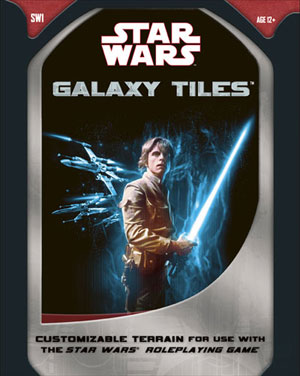
I've found minis save a lot of describe-who-is-where-time in combat. I've even used them to describe entire flashback scenes. If one does use minis, I can't recommend these tiles highly enough (and 2 sets is preferable):

rpgstarwarsgalaxtiles.jpg
Galaxy Tiles
Edited by Lorne

I'm keen to introduce a whiteboard though into my sessions, I just don't have the room for it in my current residence.

For gaming, you want a portable board. 2'x3' is a really good size. Magnetic can be very helpful.

This is basically what I had in mind. And I've certainly found plenty of options at shops, it's just not practical in my current space when character sheets/dice/GM stuff/snacks/drinks/other **** is cluttering the table.

Ooo... whiteboards sounds nice. I initially thought of using maybe Roll20 to show movement as I got crappy drawing skills....

No need to be an artist, simple line drawings work fine just to show relative positions.

This is why I've considered getting one. While some players and GMs do well without maps, others (notably newer players) are more confident with a visual reference of the environment. I'm only relatively new to tabletop gaming myself (never played D&D) so I find even crude diagrams extremely helpful! Otherwise I'm asking questions like "can I get to this guy in one maneuver?" or "how far away is this door again?"

At my last session as a player, we had three unexpected people show up who were invited to join the table. Whilst incredibly fun, this brought the PC count to seven and the game slowed because we were relying on abstract descriptions about player positions and what-was-where. Noticing the GM getting a little overwhelmed, I improvised by pulling out my Beginner's Adventure tokens to represent PCs and the GM started substituting minions with spare dice. Combat was a lot smoother after that.

I don't know if this counts. It doesn't really make the GM's job easier but it's instant immersion for me: SOUNDS!

I love that my GM uses sound boards for sound effects and mp3's for music appropriate to the scene we're in. The sounds of Star Wars are at least as iconic as the visual effects. I might be biased but, even if you ignore that, you can't really do visuals at the table but adding sound is really easy.

It's easy to describe a chilling scene but when you've cornered a bad guy and you smugly think it's game over for him only to hear the tell-tale sound of a light saber igniting, you can only OMG so much.

I really want to add this sort of stuff to my sessions as well, but I haven't really found an elegant solution. How does your GM do it? I run my games from the iPad, but none of the official Star Wars soundboards are compatible with it (Flash, I'm guessing?) and I can only find super generic 'sci-fi' soundboards in the app store (thinking hovering fly saucer or pew-pew-pew laser sound effects).

In a recent session, our group was in a nightclub to discuss a job and the GM just whipped out YouTube on his phone and played the Afterlife theme music from Mass Effect 2. Instant immersion!

I really want to add this sort of stuff to my sessions as well, but I haven't really found an elegant solution. How does your GM do it? I run my games from the iPad, but none of the official Star Wars soundboards are compatible with it (Flash, I'm guessing?) and I can only find super generic 'sci-fi' soundboards in the app store (thinking hovering fly saucer or pew-pew-pew laser sound effects).

The sounds are easy enough to capture and download on a computer, then you can transfer them over to a soundboard program on your iPad.

It would be nice if the Disney StarWars.com site was iPad-friendly in this respect, but until then, we can work around those problems.

What tools do fellow GMs use when running a SW RPG game? I mean aside from the regular GM screen, paper, and pencil....

The best I can think of is OggDude's character sheet program. I'm a sucker for clean sheets and I've entered relevant info so minimal page turning of the rulebook is required. It also helps me double-check XPs vs. purchased skills and perks.

What I'm looking for in particular is something that will help me organize and keep track of things when running a campaign. Things like Wounds, Strain, etc. as well as party gold and XP. I know, I know, what's wrong with a piece of paper? But I'm prone to lose that bit of paper whereas if I've got a record on my Dropbox account, it's easier to have it wherever I go.

Also, I've just started to re-examine virtual tabletop programs. I've used Fantasy Grounds about a decade ago, and just got to play with Roll20. Does anyone have a favorite virtual tabletop they can recommend as well as why they recommend it? I'm thinking even for face-to-face games, nothing beats a good visual aid given by a map or picture. Sure, I can print it out but showing the picture on a 27" screen just works better. Plus, I save on paper and ink and be environmental, blah blah blah...
have you looked at the GM tools that come with oggdudes? he has a party sheet, adversary tools and an encounter designer... a lot of people miss that stuff.

i am not a newer player but I really want maps...because I am sick and tired of a GM describing where everyone is and then when I go to act they go no your over here not over there. Screw that show me on a map. confusion ruins immersion.

For sounds, if you want to invest the time and have authenticity, you need two products (at least on a Mac... have not done it from a PC, but it should be the same on both if I remember correctly).

1) Audacity. You will use this to record, snip and save your files.

2) Soundflower. You will use this to allow the computer to actually hear the sound that you are playing (normally it goes straight to your output).

Copyright. If you are using it only for your personal enjoyment, you can do this. If you are doing podcasts and make money from it, I would say this is a no-go option (just to CMA).

Depending on how much storage you have on your computer will depend on how much you want to capture at a time. As it is easy to go in and out, I would just go for a certain sound at a time without dialogue and preferably little background noise. That is the time consuming part. Once you capture it, you use the sliders to isolate it and save it out to an MP3. Where you play it or import it after that is up to you...

There are other ways to do it, but this is rock solid and free.

I don'the have enough experience to compare my GM to others so I am not sure what he could be doing that's extraordinary. But he is my dad so he's kinda used to me being around. That doesn't mean I don'the need to ask questions if I don't get something and sometimes I don't really get it, despite their efforts (like what some aliens look like)... but that's just how it goes. I get by irl without some of those details, too! I'd rather deal with not really knowing exactly what a bothan looks like than bog the game down worrying about it.

My GM didn't record the sounds himself. For the sound effects, there are sound boards already available that make this easy enough to start. The one at Starwars.Com alows you to mix and For the music, your favorite mp3 player works, too. There are plenty of ways to strip audio from sources like YouTube where people have already done the work creating some great sources for background sounds and music.

BTW, use Puffin Web browser for Flash compatability on your iPad.

Edited by PrettyHaley

I haven't done it yet, but I've been slowly prepping to move my play from the dining table to the coffee table. I have an Ipad hooked up to a large TV in my living room and the "3D Virtual Tabletop" app (see below). It allows you to easily import digital maps and tokens created with whatever pictures you can find online. The tokens can have varying sizes (a.i. Taun Taun bigger then a PC) and can be moved around the map. The grid can be turned off which makes it great for narrative play vs. tactical.

I tested it out with the basic set's cantina bar fight scene. I was easily able to import the map and find appropriate art online to make into tokens to move around during the bar fight.

https://itunes.apple.com/us/app/3d-virtual-tabletop/id518159796?mt=8

BTW, use Puffin Web browser for Flash compatability on your iPad.

Thanks, I'll try this out!

My iPad is pretty central to my sessions, because I place my adventures/sheets straight into Dropbox. Additionally, I also have the FFG Dice app for emergencies (ie, someone swallows my dice) and a Chromecast on my television for mood music (just no sound effects).

And even though I own the official GM screen, I find it a little too cumbersome for my table. An iPad with the flip cover/stand is a remarkable, more lightweight substitute.

I've recently found a great app for my iPad that does just about everything I was needing to track notes and ideas as a GM. It's called ThinkBook.

ThinkBook - Todos, Notes, Projects, Outlines by Bitolithic Pty Ltd

https://appsto.re/us/_vHjz.i

It lets me make books, pages, lists, sub lists, import images, create group lists, and a lot more. It's really helped me keep organized and get key points into the game. I still have paper to track combat and track skill checks and such. But it's my main story and note tracker for sure. Highly recommend taking a look.

Example Screen Shots

https://dl.dropboxusercontent.com/u/3986987/FFG%20SW%20RPG/thinkBook1.PNG

https://dl.dropboxusercontent.com/u/3986987/FFG%20SW%20RPG/thinkBook2.PNG

Edited by Joress