How you print your cards?

By Haipperi, in Talisman Home Brews

I like many of the cards and characters everybody has designed, but I was wondering how to make them look and feel like the "original" cards coming with the game and expansions?

I am not so interested in using plastic card covers. Maybe I could just take the files on an USB-stick, some original cards as a model and walk into printing store? Has somebody managed to create nice cards at home/workplace with good color printer and thick paper?

Haipperi said:

I like many of the cards and characters everybody has designed, but I was wondering how to make them look and feel like the "original" cards coming with the game and expansions

Impossible. There is no way to accomplish what you suggest without going into commercial production.

Haipperi said:

I am not so interested in using plastic card covers. Maybe I could just take the files on an USB-stick, some original cards as a model and walk into printing store?

Yes, I've done this, though if you're thinking about printing a grid of fronts and backs two-side on one sheet, think again. I've done it, and for economical processes at a print shop, the fronts and backs won't line up perfectly... sometimes not even adequately. There's as much drift as with a home printer... because the shop is running off your card sheets on a color printer.

But the quality of print is better than anything you'll do at home. Make sure you put crop marks into you layout so you can cut up the sheet correctly... whether you do it or pay to have them do it. There are some other processes as well. Drop by TalismanIsland.com and nose about for some articles on this topi.

Haipperi said:

Has somebody managed to create nice cards at home/workplace with good color printer and thick paper?

Yes, and the best way is lighter weight cardstock (the kind designed to be flexible enough to "bend" through an inkjet printer). Do the card layout with the card backs on the same side as the card fronts, side by side, and alternated along each row. It should look as if you could cut a front and back out together and fold them into a little booklets. This way, when you cut out all fronts and backs by crop marks, they will be clean edged and approximately the same size. Then use an aerosal mounting adhesive to bound the fronts to the backs.

Optionally, you could cut them out as little booklets, little score a line between a card front and back, fold along the scoring, then adher as above. It's trickier and takes practice, but front to back line up is superior to bonding separate fronts and backs.

Some people like to laminate them with sheets for such bought at office supply stores. Some laminate before cutting, so lamination doesn't have to be trimmed off afterwards.

I've done this been reasonably satisfied. But as to making all the cards look the same, give up, it ain't going to happen without extra expense, card sleeves, homemade backs to cover commercial cards, etc., etc.

I'm old school myself, and well remember Talisman 2E and how all of its backs tended to vary in tone and hue from one expansion to the next. So what? The cards played the same, and when enough were in the pile, all variations didn't really tell you much anyway. It's a board game, not video game, and perfect match of cards done in different offset runs don't match perfectly, ever. Technology has gotten better in that since the days of 2E, but even now it isn't perfect either.

Textured card stock may help hide some of this, but the differences are there if an offset process is being used.

Hiya there,

I've tried many methods for printing hundreds of cards for warhamer quest over the years but in the end i simply sleeve everything.

Although I haven't tried to find sleeves for Talisman "YET" anyone know of a supplier of sleeves that have a nice fit, including character cards?

Mayday make a "Mini Euro" sleeve that should do you.

final.JPG

Mayday Games

Ah Jon, you beat me to the reply by seconds.

Just in case anyone is interested, I added another page to Talisman Island with pictures showing how I make cards for use with the game.

If you do not wish to see the destruction of "real" cards from an Upgrade Pack - Do NOT click the link below...

http://www.talismanisland.com/me_cards.htm

demonio.gif

I guess $20 plus maybe 7$ S&H isn't TOO bad for 104 Adventure backs (plus others). That's about $0.26 a card back, plus printing fronts and possibly sleeves if all one wanted are the Adventure cards. On second thought, that's beginning to add up. Unfortunately the Upgrade pack seems to be on back order in the few places I've peeked.

Time for some more experimenting.

Indeed, cost and availability are two factors that might put some people off this method, but it's one that I started to use in 4th Edition and it's the easiest way I have found.

I truly don't have a problem with home made cards and how they look. As I've mentioned previously, I used to use cards in 2nd Edition with Black/White cardbacks!

I've just ordered a sample of Mini Euro sleeves to experiment with, but I don't really feel comfortable with the idea, though we shall see.

I just added one more pic to that page showing what other stuff can be made if you have the Upgrade Pack which shows off your Neutral Alignment card design rather nicely!

As I've stated in about 2 other threads already, the Mini Euro cards are the perfect size for 4th ED Revised Talisman. They are also dirt cheap.

Up to now, I have only printed out my own expansions which I made specifically to be self-contained (i.e. they don't go in the stack of Adventure Cards) to avoid the issue of dissimilar prints. What I did with those was print out the front side on photographic paper and print the card back on normal paper, glued them together and then printed them out.

Now I've got my hands on the Mini Euro sleeves, I intend to print out Talisman Adventure card backs and Talisman Spell card backs, slip them in to the Euro sleeves and then put the original copy of the card in there too. It isn't too expensive, just time consuming. But once done, I will be able to add in any and all additions that people make (and there are some great cards out there!).

The Neutral Alignment card looks pretty good there! Eventually, when Upgrade packs are available again, I may order one, get some sleeves as well, and give both methods a try.

Did anybody tried to print cards with a color laser printer?

Cheers

If you've ever gone to a print shop for color copies... that's laser printing. The print quality is very nice, though the stock availalbe for such isn't thick. And there is still substantial drift when printing front and back to line up.

I work in at a print shop. Does anyone happen to know what kind of paper stock it is?

Thanks

JCHendee said:

If you've ever gone to a print shop for color copies... that's laser printing. The print quality is very nice, though the stock availalbe for such isn't thick. And there is still substantial drift when printing front and back to line up.

Hi JCHendee,

Thanks for letting me know that the laser printing come up very nice gran_risa.gif , my question came up from checking the referred page from Talismanisland in which he writes about differences with new and old types of ink sad.gif

Cheers

I had a word with a printer a bit ago about inks and how I liked to get my cards laser printed so the ink would not bleed. He said that inkjet ink these days is a vast improvement from when they first came out, so I thought I would give a bit of home printing a try. The quality of the print I have on the cards that you can see in the examples is rather good and certainly a lot better than my efforts of years gone by.

I think whether you have them laser printed or by inkjet, if you spill on them both varieties are going to be spoiled!

talismanisland said:

I had a word with a printer a bit ago about inks and how I liked to get my cards laser printed so the ink would not bleed. He said that inkjet ink these days is a vast improvement from when they first came out, so I thought I would give a bit of home printing a try. The quality of the print I have on the cards that you can see in the examples is rather good and certainly a lot better than my efforts of years gone by.

I think whether you have them laser printed or by inkjet, if you spill on them both varieties are going to be spoiled!

Thanks for putting your printing experience on your web site, since the price of color laser printer as become affordable in the last couple of years, i've bought one but I haven't done any card printing yet but it shoundn't be long now before I start. happy.gif

BTW thanks for the link to "Mayday Game" sleeve, I've ordered ten pack yesterday gran_risa.gif

Cheers

Well, some interesting news tonight from FFG. They are making their own line of sleeves!!!

They are doing a range of sizes, some clear and some with backs. Unfortunately, it would seem the Talisman sized ones are all clear. I suppose it is possible that they could do a run for the game though...

News post: http://www.fantasyflightgames.com/edge_news.asp?eidn=661

Catalogue page: http://www.fantasyflightgames.com/edge_minisite.asp?eidm=86&epmi=s

The ones that Mayday make are the same size as the "MIni Euro" size, which are slightly too big for Talisman, but the "Mini American" size should be just the ticket!!!

There is a PDF on the catalogue page which shows how many packets of whatever size you need for you game and Talisman is listed...

AWE SOME !!!

OMG, they keep updating the page. The news must have been really NEW...

FFS01-mini-am-measure.jpg

gran_risa.gif gran_risa.gif gran_risa.gif This is just AWESOME !! gran_risa.gif gran_risa.gif gran_risa.gif

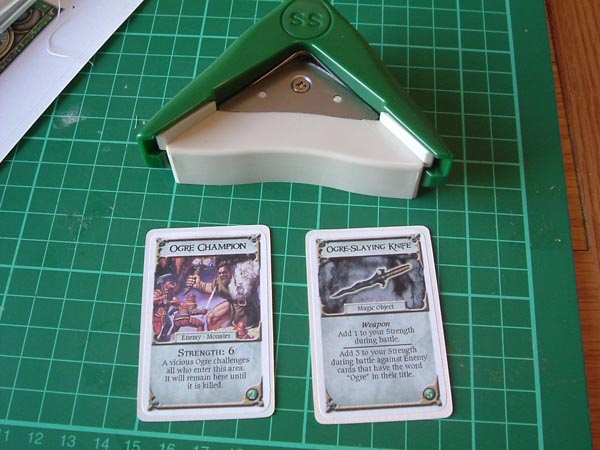
Hmm... I bought a corner rounder to have a go at tidying the stickers up when cut out, but it did not really go as planned.

me_cards7.jpg

The problem is, the type I have bought is JUST the right size for cutting the corners, but after you have rounded one corner, the stickers are slightly too small to use the right-angled sides properly, meaning the rounding on the last three corners is not quite true.

It would be okay for the cards themselves, but the stickers are that little bit too small.

The results aren't too bad, but I don't think I will bother as I won't be 100% happy with the results versus the effort in clipping them all, and to be honest there isn't really much of a difference.

JC has pointed out some actual corner punches, rather that this "clipper" affair so perhaps those will work out a little better.

The rounded corners actually look pretty good, and overall might still kept square corners from lifting over usage and time. But you may be right about the hassle of doing a lot of them one at a time... um, four at time per card. I ordered up one corner rounder I found that actually switches between 1/4 and 1/2 inch cuts. My intention was to try actually trimming cut cards. I'll give that a try as well as some work with stickers, and see how they come out.

...and today I see that Mayday Games has responded by adding a few more sizes to their range of sleeves....

Mayday Games

pic521273.jpg

Hmm... FFG $2.49 for 50 x 100 micron - Mayday $1.75 for 100 x 40 micron

I am not being a fanboy, but the 40 micron ones are a bit flimsy to my mind. However, I have not seen any 100 micron sleeves, so have nothing to compare to.

But wouldn't the 40s be a little less resistant during shuffling? Or an I thinking backwards about that measure?

Not sure about that really. I shall be giving them both a test run though.

I think the problem might just be a question of scale. 200+ cards piled up PLUS sleeves of ANY kind would be interesting to keep together...

Ah... the pile up... hadn't though about that. Another possible plus for the 40s.

Finally got around to a card'n'sticker test. Ran the image off a normal inkjet at standard (non-photo) resolution. It actually looks better in hand than in this image. Instead of rounding the stick corners I just nipped them off. Also did the cutting with scissor, quick and dirty. Overall, it produces a good usable card, though the thickness and bit of rise due to the sticker makes it just a little bit difficult to shuffle in.

image_1.jpg