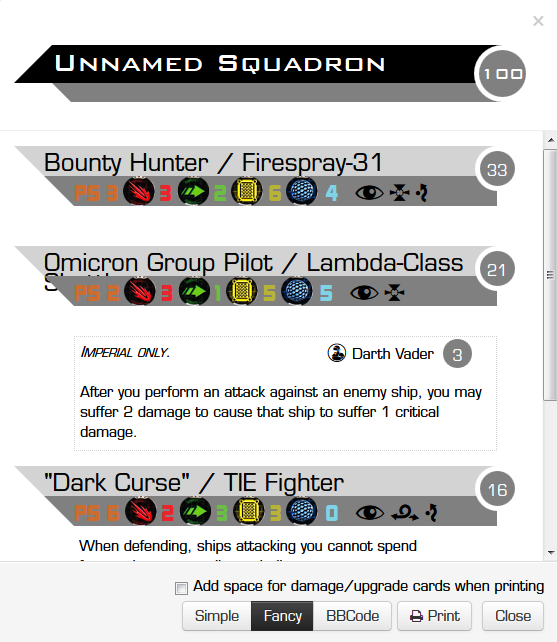
(Yet Another) Squad Builder: Now with fancier printing

By geordan, in X-Wing

Thanks to GitHub user wffurr, fancy printing in YASB is even fancier -- card text for your upgrades will now also show up on the printout. Now you can leave all your cards in the box for casual games!

Builder link in my sig below.

As always, bug reports, comments, and suggestions always welcome.

A way to copy/paste builds to be able to post them, like on this forum (if there is a way, i never found it)

There's the Permalink button in the top right, which you can right click to copy URL. Or, there's the Export to XWS button at the bottom to export the squad in a builder-independent format so you can import it into other builders.

A way to copy/paste builds to be able to post them, like on this forum (if there is a way, i never found it)

Click the button labeled "Print/View as Text", then click "BBCode" at the bottom of the new box that pops up. Copy and paste away!

Make your list and hit view as text then select BBcode you can copy and paste your lists to your heart's desire.

It's a nice tool but could be a little more friendly to tablets.

Oh right, I put BBCode export in there. You'd think I'd know what I'd written... :unsure:

Does anyone else have trouble pushing the x to delete the chosen upgrade ? maybe it would be better to have a value of none as the top option so you just scroll to it when you dont want an upgrade there.

Edit it is difficult because of touch screen

Edited by Dragoonsonic

Have huge ships and the associated upgrades (huge ship only or requiring energy) not show up in the drop down menus if standard format is selected. If I don't have an epic format selected I don't want to have to keep scrolling past the 2 halves of the corvette or targeting coordinator.

Does anyone else have trouble pushing the x to delete the chosen upgrade ? maybe it would be better to have a value of none as the top option so you just scroll to it when you dont want an upgrade there.

Edit it is difficult because of touch screen

It's better than it used to be, but yeah, getting rid of an upgrade on a tablet is still tricky.

New layout looks great, but I've also uncovered a minor flaw (see picture)

XBug_zpsylr4j4wc.png

If you look at the Shuttle Pilot name, it is being cropped by the stat bar a little bit. I'm running Firefox Developer Addition 35.0a2 with a dual screen 1280 x 1024 resolution if that information is of any help.

Does anyone else have trouble pushing the x to delete the chosen upgrade ? maybe it would be better to have a value of none as the top option so you just scroll to it when you dont want an upgrade there.

Edit it is difficult because of touch screen

It's better than it used to be, but yeah, getting rid of an upgrade on a tablet is still tricky.

It almost feels like a test of your worth to use Geordans. Idk. I think I might actually masochistically like that difficulty of using it on a tablet.

--

Thank you!!!!

Have huge ships and the associated upgrades (huge ship only or requiring energy) not show up in the drop down menus if standard format is selected. If I don't have an epic format selected I don't want to have to keep scrolling past the 2 halves of the corvette or targeting coordinator.

Good idea; I'll add that to the queue.

New layout looks great, but I've also uncovered a minor flaw (see picture)

XBug_zpsylr4j4wc.png

If you look at the Shuttle Pilot name, it is being cropped by the stat bar a little bit. I'm running Firefox Developer Addition 35.0a2 with a dual screen 1280 x 1024 resolution if that information is of any help.

Yeah... I'm not really sure what to do about that. FFG needs to come up with shorter names for their ships!

This is going to be a lower priority since it doesn't really affect the functionality; things should still print out okay.

Does anyone else have trouble pushing the x to delete the chosen upgrade ? maybe it would be better to have a value of none as the top option so you just scroll to it when you dont want an upgrade there.

Edit it is difficult because of touch screen

It's better than it used to be, but yeah, getting rid of an upgrade on a tablet is still tricky.

I keep meaning to make that stupid X bigger and then not doing it. I'll do it, Soon.

Really cool update! My local store is launching a league today and with this I can type in all squads and see everything on a single sheet of paper :)

One thing though: the PS # color on grey is hard to read for my eyes. As if there is not enough contrast. Could this be changed to a different color?

A way to copy/paste builds to be able to post them, like on this forum (if there is a way, i never found it)

Click the button labeled "Print/View as Text", then click "BBCode" at the bottom of the new box that pops up. Copy and paste away!

Oh. Never noticed that button.

One thing though: the PS # color on grey is hard to read for my eyes. As if there is not enough contrast. Could this be changed to a different color?

Oh, yeah. Another thing I keep meaning to do. My eyes also hate that. On the bright side, it's forced me to commit almost every pilot's skill to memory...

One thing though: the PS # color on grey is hard to read for my eyes. As if there is not enough contrast. Could this be changed to a different color?

That whole section is hard to read because of the dark grey. You could just change it to the same grey as what is behind the Pilot and Ship names.

As for the ship names going too long, maybe replace the ship names with the ship symbols located on the bottom left corner of the ship cards.

Other than those two issues, it looks quite nice.

I like the ship icons idea. I'll see if I can have those added to the font I use.

I don't know how many ships have too long of a name, but with the shuttle, can you remove the "-class" so that it's just "lambda shuttle"? Would that make it fit?

Well done geordan ! ;-)

I have always preferred your squad builder while on my iPhone. Thanks for your hard work!

Oh right, I put BBCode export in there. You'd think I'd know what I'd written... :unsure:

Weirdly, on my Nexus 7 (2013), every time I long press to copy for the BCC code, it sends me right back to the simple code version.

BTW: I may use your squad builder more than _any_ other website!

Weirdly, on my Nexus 7 (2013), every time I long press to copy for the BCC code, it sends me right back to the simple code version.

Whoa. That's bizarre. Happens on my Nexus 5, too, and I have no idea why. I'll look into it.

Oh, also. I can't log in using my iPad. When I click on the service I want to log in under there the box changes to a message saying

"OAuth login is in progress. Please finish authorization at the specified provider using the window that was just created."

But no window is created, it just sits there.

Try clearing Safari's browser cache; I've seen this happen before and it may be due to some caching issues.