I was wondering if anyone had a good app or website for designing maps? I'm trying to map out an underground dungeon and a graveyard for a halloween game I'm running.
map designing
There is a java based web program called "hexographer". It also has some free token designing tools.
Online tabletops like Maptools and Roll20 also have access to clipart style components that can allow you to make maps and export (with a little practice) for printing.
There's a few map-making programs out there. Dundjinni being the one that comes to mind. Haven't used it myself though.
GIMP is a free open source image manipulation program. I've used it a bit, different from what I normally use, but seems serviceable.
And of course Photoshop/Photoshop elements. Photoshop is pricey, Elements more affordable but has less capability. Photoshop is largely what I use, but that's because I've been using it for years. Though good news is because it's so widely used you can usually find a tutorial for anything you want to do.
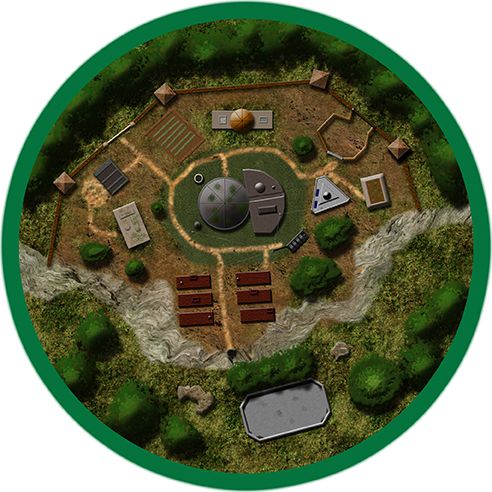
Remember though, in this system maps aren't as vital as others. So something like this:
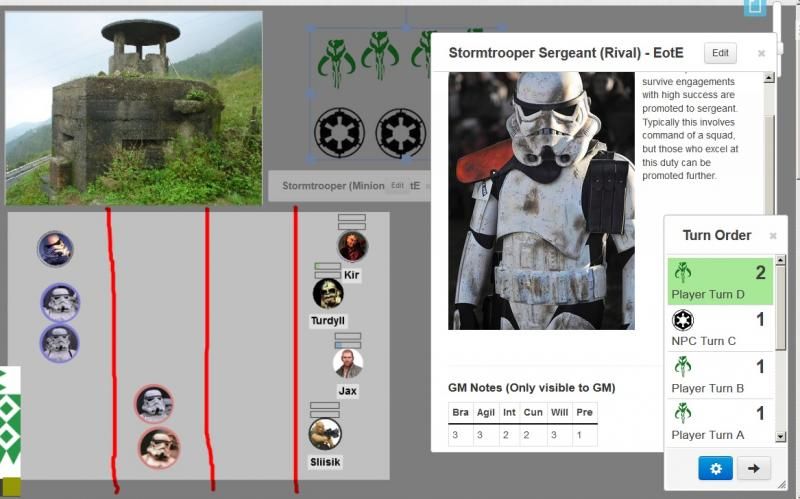
showing an image of "what it kinda looks like" along with a way of measuring ranges will often do. When you play games with me you are far more likely to see this then a full blown map.
Edited by GhostofmanDangit Ghost...
That Range thing in the lower left is excellent, even if its stupid simple.
I use maps in my games. Perhaps i could use both using a range chart like you have.
Thanks for the idea.
What app are you using to get those tokens?
No App for the tokens, just get an image that works (most of the Storm Troopers are right from a screen cap of ANH) take into Photoshop or GIMP, circle select the face and copy/paste into a new file, resize to fit (70x70 is default for Roll20) and save out as a PNG to preserve the transparency. Then just drag n drop into Roll20.
Colored borders for keeping track of minion groups are just the Roll20 Aura effect.
Dangit Ghost...
That Range thing in the lower left is excellent, even if its stupid simple.
It can work really well or not depending on the group. What I like about it is it doesn't establish much more then the minimum needed for the encounter. So when you roll a Triumph or Advantage the players have a little more freedom to call out a local feature that wasn't there a moment before.
Edited by GhostofmanI been using my toddler's eisle. ^__^
For those without the skills or access to do Photoshop, try TokenTool to quickly grab and make tokens from any image with little difficulty.
If you are looking for a CAD type program instead of a hex plopper, I use AutoRealm. Simple and free. Actually drawing, even with a CAD, will take much more time then using the hex programs, but I often find the later unable to make what I imagined in the first place.
Microsoft Paint is simple tool that is easy to use and often pre-installed on computers. It may not make maps that look super fancy, but it works great from a practical standpoint.
Microsoft Paint is simple tool that is easy to use and often pre-installed on computers. It may not make maps that look super fancy, but it works great from a practical standpoint.
I second Yaccarus on this. I use Paintbrush, which is the closest equivalent to Paint that I could find for my Mac. I think of the style as being reminiscent of Dungeon Magazine in the 80's, but it works. Check out my blog for examples.
-Nate
Microsoft Paint is simple tool that is easy to use and often pre-installed on computers. It may not make maps that look super fancy, but it works great from a practical standpoint.
I second Yaccarus on this. I use Paintbrush, which is the closest equivalent to Paint that I could find for my Mac. I think of the style as being reminiscent of Dungeon Magazine in the 80's, but it works. Check out my blog for examples.
-Nate
why not use gimp? it's free and has so much more power than microsoft paint. I've been using gimp for about a decade now, it's not quite as good as photoshop but it's somewhat close and did I mention it's free. my most common use of gimp is to crop images, or change the size of them, for the last month or so I've been using it to cut large minis maps into pieces that can be printed and brought to the gaming table. Honestly 17 by 11 at office max for $1.25 a sheet is the cheapest way for me to print a map (most maps would be $5). I tried cutting them into 8.5 by 11 and printing them on my personal printer but that eats up the ink crazy fast and I have one of those all in one printer, scanner, photocopier, fax machine, photo printer printers and because it can print photos the ink is killer expensive I think 25 bucks on ink would get me 3 maps. like I said office max is the way to go and 17 by 11 is the cheapest/most convenient size (laying out a whole lot of 8.5 by 11's is time consuming). I also use gimp to cut figures out of pictures and put them on transparent backgrounds (pngs) then you can lay them on top of each other for scenes. I made myself a custom desktop for my new computer in gimp. Named the computer lion of Judah so the desktop is an aslan desktop with akiane's "prince of peace" on top and to the right (transparent back) I should have spent more time on distinguishing between the black background of "prince of peace" on the right side of the picture and hair (that is in the shadows) but the composite picture didn't turn out too bad.