Making Talisman Adventure type cards now possible with Strange Eons

By talismanisland, in Talisman

Interesting... I take it there's not seperate control over character height and width? I noticed that basic HTML tags are being used for format, so does SE understand the Style attribute of HTML elements? In other words, would it understand something like <p style=''font-width: 95%;">?

I gained extra space for my description area by setting character width to 95% in PS. I kept the overall font point size the same. (I'm using the traditional Caxtion where point 6.7 is equal to the 7 in your font version). But if there is a scripted way to make the graphic template change based on text body line count or length or size, then that may offer me what I'm after...

A way to make it shift more times for more intermediate template sizes, similar to the more flexible floating midbar I use in my PS Talisman card templates.

There is a list of the tags that SE recognises here -

http://www.sfu.ca/~cjenning/eons/tag-table.html

I think there are other tags that work, but you would have to experiment or ask Chris. You can use "size" tags, but I am not sure about adjusting the width of fonts. If it can, it would be rather good for 2nd Edition cards as they all use text compressed widthways - I have had to use TNR Condensed as an alternative for now.

You would be able to alter the code of the extension to incorporate more statements and a range of template sizes etc. It is possible, for instance, to create all Adventure type cards from the same from the same window using varying "IF" statements to decide on actual template background used, size, types, whether the encounter number is displayed etc. You can also measure regions width-wise as I have done with the 2nd Edition templates in order to make part of the edging disappear if the card name is rather long.

se_titlewidth.jpg

It is actually possible to move text boxes around as you make a card using the Region Editor function, but it is not really ideal to do this each time, so there is a trade off of text positioning that is "acceptable". PS is much better for that to be honest, but not everyone has it and it takes a dog's age to master. That's why I was really pleased when Chris said that SE would have the ability to create custom content, just as I was when Duane and Peter made the card creators for 2nd Edition. The ability to load SE and produce a passable replica of a card with a few mouse clicks is a real boon.

I have learned a few bits whilst clumsily editing the extensions this past couple of weeks and I may have a go at something, but it might end up being a memory hog if it is loading all of the different possibilities/templates up when you run it.

It does use "HTML-like" tags, but the mark-up engine is not HTML. It doesn't use HTML styles in the literal sense (no CSS syntax), though you can create logical styles quite easily using <define>. The mark-up system is not meant to be as powerful as HTML, because it is assumed that the person who wrote the editor code did the hard work of establishing the correct styles and layout for you. It can do less things, but the things it does are usually easier.

There is no tag for changing the width at present, though one could be added. In fact, it'll only take a couple of minutes, so I will add one for 2.00.5. In the meantimethe plug-in author can control the width with code along the lines of:

bodyBox.defaultStyle.add( WIDTH, WIDTH_SEMI_CONDENSED );

or if that is not enough:

bodyBox.defaultStyle.add( WIDTH, WIDTH_CONDENSED );

As for using extra memory, don't worry about it too much. SE creates a "cache" of images and can dump ones not currently in use to free up space, then read them back from disk if they are needed later. When you start it, it preloads all of the stuff for AH in the background. If you start to run out of space it will dump all of those before you actually run out of memory, and that leaves you a lot of room for Talisman images. If you have the memory management plug-in you can see all of this happen: start up SE but don't do anything and you can see the memory use climb up for a while, then level out. If you mouse over it you can see the exact number of images in the cache, and if you right click you can force it to dump all of them at once.

Cheers,
Chris

Excellent Chris!

I will hold off completing the 2nd Edition one until that is done then as it will be good to be able to shrink the width of the standard font. That edition uses 70% width for Body and 75% for Title and Type.

Over the next couple of days I will have a try at making the multi-card extension. It will be a challenge for the old grey matter, but should be a fun project.

Thanks for the info, Chris... and to you too, Jon. That clears up a lot for me on future considerations. I do find SE to be a fantastic offering for the community, but with all my templates set to go, and doing the image work in PS anyways, it's probably best for me to stick to that for now. But I will be watching with interest all the great development work you two are doing.

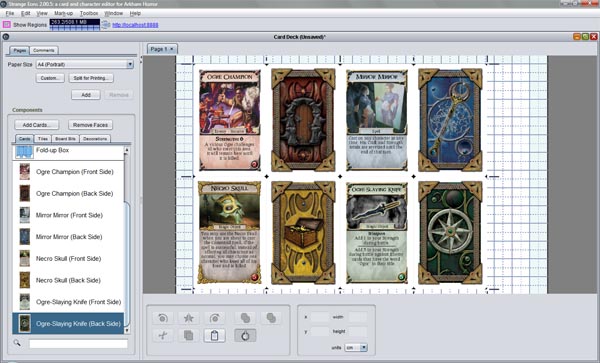
How do you print more then one card on a page? I can't find the setting or what ever I need to do it.

There is a deck editor in the main Strange Eons creator.

You will need to save your cards as .eon files

Go to New / Decks and Expansions / Deck of Cards

Click the Add Cards button and select which cards you want to add to the sheet.

Click the Remove Faces button after highlighting cardbacks etc that are not required. For example, if you are printing a load of Dungeon cards, you only need ONE cardback to drag into the page.

There is a little How To displayed when you open it up, which you can select and delete (after you have read it!) and then you can just drag the card images you want into the page.

If you drag a card over another one and it turns BLUE then it means that when you drop the card, it will snap into the position indicated.

se_printdeck.jpg

Just putting the finishing touches to this and that....

se_talisman_all.jpg

I'll see about putting the extensions online soon.

I think, we should all say a big thank you to Chris Jennings (Thelric) and Talismanisland ( forgive me if I forget someone) for all the hard work they put into this program so that people could easily create there own cards for Talisman no mather which edition they own! gran_risa.gif aplauso.gif

The program is easy to use and fast, you get custom cards in no time aplauso.gif

Kuddos to you and take a bow, you earn it.

Makes me regret there wasn't any computer courses in school in my days.. llorando.gif

Cheers

I whipped up around 30 cards in a couple hours. I love this program.

The worst part of finding good pics for them. gui%C3%B1o.gif

akuma508 said:

I whipped up around 30 cards in a couple hours. I love this program.

The worst part of finding good pics for them. gui%C3%B1o.gif

As always. preocupado.gif

If only I knew someone willing to spend his or her life creating beautiful art for my cards... gran_risa.gif

Thanks guys, but Chris did the real leg work. I have just been tweaking this and that to add functionality to his DIY extension for us mad Talisman fans! JC also deserves a ripple of applause for his graphic design on the Alignment cards.

Just in case anyone was wondering why only Adventure cards are listed in the above screenshot. The different types are selected from that option. Each choice determines whether a certain variable is used or not.

se_adventure.jpg

For example, selecting Spell as a card deck means that the card type is automatically set to "Spell" and the encounter number is not used. If you select Warlock Quest, it ignores the card type, encounter number and long/short text options and changes the title to allow wrapping and the position of the expansion icon and does not draw a "holder" for it. You get the idea....

tota_sneak.jpg

Hi Jon,

This is a very interesting picture that you put on talisman island:)

It looks like a Wildernis card, but also deadly with a skull on it.. gran_risa.gif

Or are they inner region cards that contain new challenges in the inner region?

I look forward to your expansion gran_risa.gif gran_risa.gif